Logo video2dn
  • Сохранить видео с ютуба
  • Категории
    • Музыка
    • Кино и Анимация
    • Автомобили
    • Животные
    • Спорт
    • Путешествия
    • Игры
    • Люди и Блоги
    • Юмор
    • Развлечения
    • Новости и Политика
    • Howto и Стиль
    • Diy своими руками
    • Образование
    • Наука и Технологии
    • Некоммерческие Организации
  • О сайте

Скачать или смотреть How to Check shutter count on Canon DSLRs, Tutoriel Canon eos digital info v1.4

  • Concept Photographie
  • 2017-03-03
  • 245155
How to Check shutter count on Canon DSLRs, Tutoriel Canon eos digital info v1.4
canoneosdigitalinfoshuttercountcounteractuationcheck
  • ok logo

Скачать How to Check shutter count on Canon DSLRs, Tutoriel Canon eos digital info v1.4 бесплатно в качестве 4к (2к / 1080p)

У нас вы можете скачать бесплатно How to Check shutter count on Canon DSLRs, Tutoriel Canon eos digital info v1.4 или посмотреть видео с ютуба в максимальном доступном качестве.

Для скачивания выберите вариант из формы ниже:

  • Информация по загрузке:

Cкачать музыку How to Check shutter count on Canon DSLRs, Tutoriel Canon eos digital info v1.4 бесплатно в формате MP3:

Если иконки загрузки не отобразились, ПОЖАЛУЙСТА, НАЖМИТЕ ЗДЕСЬ или обновите страницу
Если у вас возникли трудности с загрузкой, пожалуйста, свяжитесь с нами по контактам, указанным в нижней части страницы.
Спасибо за использование сервиса video2dn.com

Описание к видео How to Check shutter count on Canon DSLRs, Tutoriel Canon eos digital info v1.4

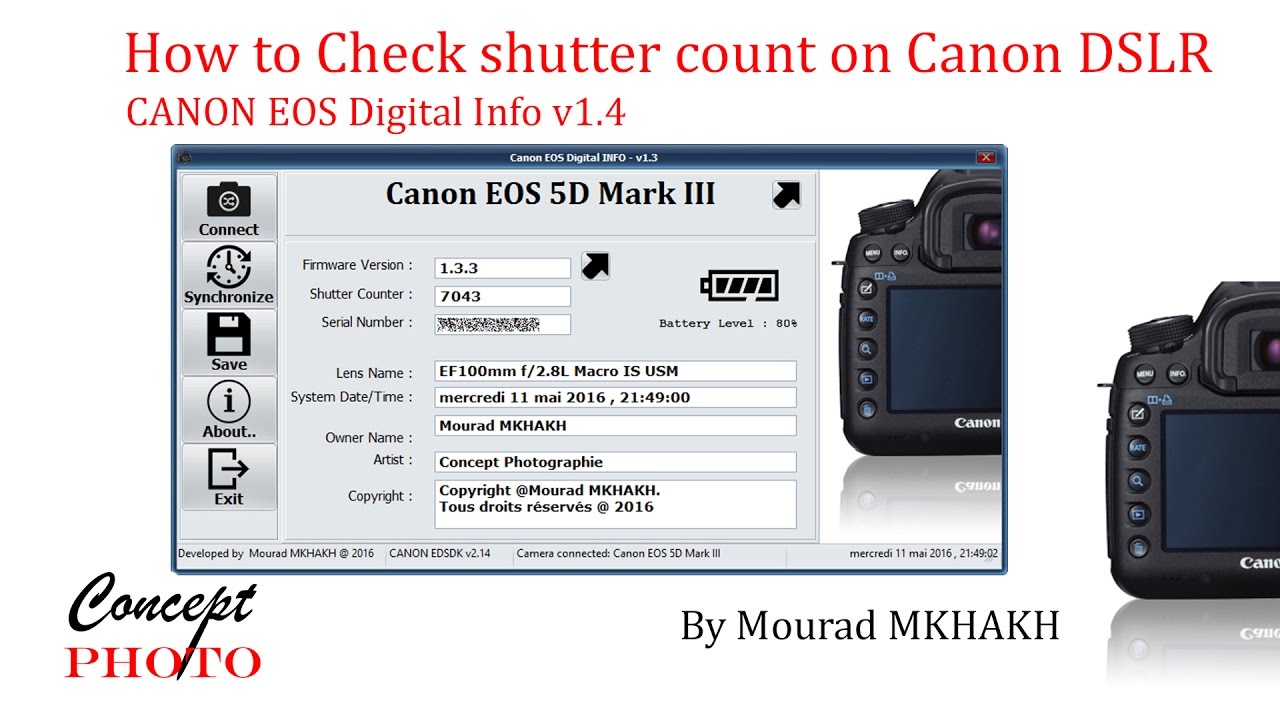
The utility is for windows users, is free and will work on most recent Canon EOS Digital Cameras (models since 2010). Informations can be read from a USB-connected camera and it provides accurate data that cannot be attainable by for example reading the EXIF. This program can retrieve and edit if possible these infos:

• Camera Model (read) + link if available to canon web site.
• Shutter Count Available in subversion sdk 2.14 only , and limited for camera with processor Digic 4, 5 and 5+ and somme camera with Digic 3). Not available on camera with Digic 6 and above.
• Serial Number (read).
• Firmware Version (read) + link if available to canon web site.
• Battery Level (read). (Fully charged battery will show 80%).
• Owner (read & write).
• Copyright (read & write).
• Artist (read & write).
• Device date/time (read & synchro within local PC date/time).
• Generate a complete report as a small text file and Jpeg screenshot.

Canon doesn’t have shutter count included on the EXIF information of an image file, as opposed to Nikon and Pentax.
There’s no official Canon based application to find the shutter count for an EOS DSLR.
However, there are a few free tools that may help you to do this. They provide some details about the camera, including product Name, firmware version, battery level, shutter Counter, date/time, and owner/artist/copyright strings. But it does not support this features: Editing the owner/artist/copyright and synchronizing date/time within the local PC's date/time.
For that, I wrote a new utility that includes all these features by integrating those that were missing.
I uses an official Canon SDK (Canon ED-SDK) to retrieve and set all camera information (shutter count is retrieved via an undocumented function).
The Canon Digital Camera SDKs is freely available on this official link: https://www.didp.canon-europa.com

Important:
I released tow subversion, one use the Canon SDK 2.14 is for camera with Digic IV, and 5/5+. DIGIC II and dual DIGIC III cameras are not supported. EOS M (mirrorless) models are also not supported. Only Canon repair centres can provide accurate shutter readings for these models. This is a shame, buyers of older models in particular have a need to verify shutter count.
The second subversion, using SDK 3.5, is for camera with digic6/6+ and newer, however it doesn't support retrieving the shutter actuations. Canon has removed some functions from there recent cameras DSLR like 80D and 5D mark IV. So, the shutter actuations reading is not supported any more due to firmware limitations. If someone want to know the number of actuation on a recent camera, he must send his camera to Canon service centre. Only Canon repair centres can provide shutter count for these models actually. It’s a shame canon won’t allow its customers an accurate way to read shutter count.
In this case, like for the Canon 5D Mark IV for example, you can try to use the second subversion using sdk 3.5 instead of sdk 2.14. You can edit and read some info but you can't read the shutter counts actuations.
The latest ZIP portable package release of CanonEosDigitalInfo are available from the Sourceforge project homepage:
https://canon-eos-digital-info.source...

Комментарии

Информация по комментариям в разработке

Похожие видео

  • О нас
  • Контакты
  • Отказ от ответственности - Disclaimer
  • Условия использования сайта - TOS
  • Политика конфиденциальности

video2dn Copyright © 2023 - 2025

Контакты для правообладателей [email protected]