Full guide to unlock and root your HTC one M7 801e, 801n or 801s on Mac OSX.
**You do not need to have S-off to re-flash ROMs, however, it is still recommended to have S-off just to be safe (I will not be doing this in this video though)
To get started, make sure your HTC One M7 has developer options, USB debugging and allow mock locations on. Then find Power in settings and ensure fastboot is unchecked.
1. Backup your device if you want to maintain your data using these commands:
For Mac:
cd Downloads
cd HTCOneRoot
chmod 755 *
./adb-mac backup -apk -all -f backup.ab
To restore your data simply enter this command after rooting is completed and you have flashed the ROM of your choice:
./adb-mac restore backup.ab
2. Now you can power off your phone. Once off simply hold Volume down and click the power button (you don't need to hold the power button, just volume down) until the bootloader screen appears. Navigate to FASTBOOT with volume keys and select with the power button.
3. Now you can plug in your device (once plugged in, ensure it says FASTBOOT USB)
4. Download and unzip the HTCONEROOT folder from here:
http://mirror20.downloadandroidrom.co...
5. open the HTCONEROOT folder and double click on the adb mac and fastboot mac files, the terminal app will open and two windows should open up (one for each.
6. While in the terminal app press command+N to open a new window. Type cd (space) and then drag and drop the unzipped HTCONEROOT folder to the terminal window.
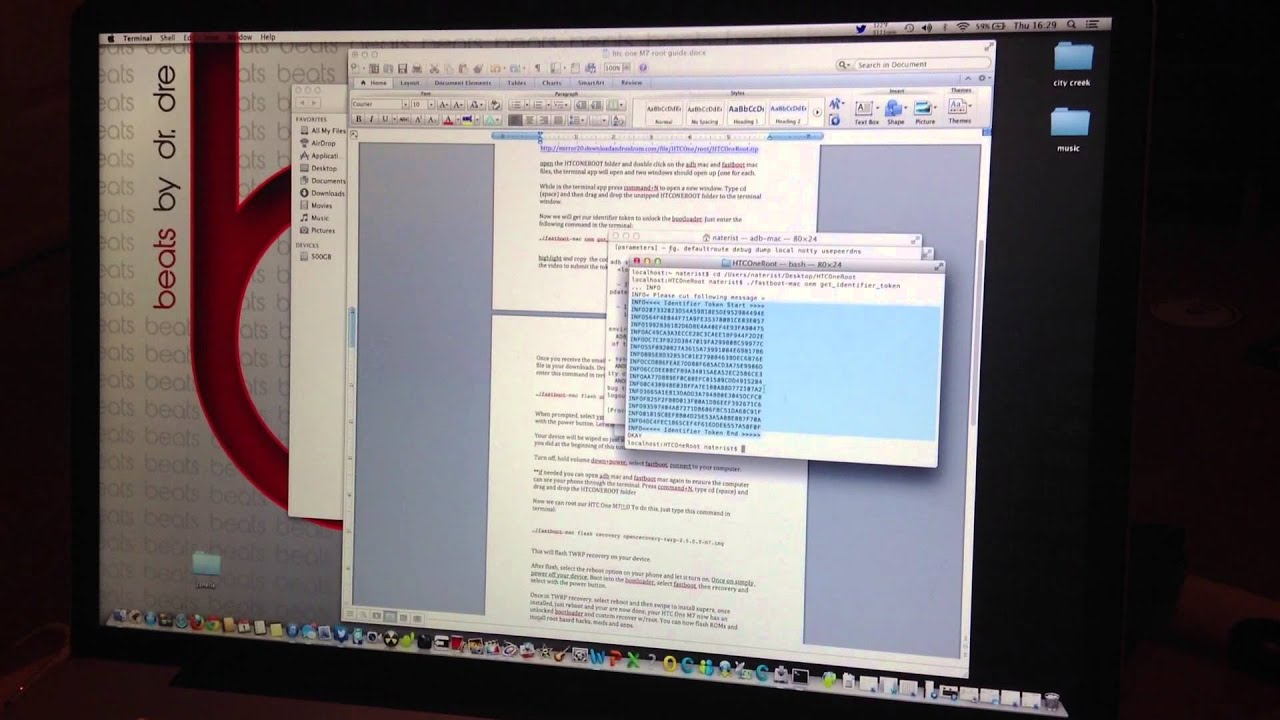
7. Now we will get our identifier token to unlock the bootloader. Just enter the following command in the terminal:
./fastboot-mac oem get_identifier_token
8. highlight and copy the code displayed in the terminal and follow the steps shown in the video to submit the token through the HTC dev website.
9. Once you receive the email with your unlock_code.bin, download it and locate the file in your downloads. Drag and drop this file into your HTCONEROOT folder and enter this command in terminal:
./fastboot-mac flash unlocktoken Unlock_code.bin
10. When prompted, select yes one your HTC One M7 with your volume keys and select with the power button. Let it do its thing til it turns back on.
***Your device will be wiped so just set up and ensure the settings are all correct as you did at the beginning of this tutorial***.
11. Turn off, hold volume down+power, select fastboot, connect to your computer.
12. **if needed you can open adb mac and fastboot mac again to ensure the computer can see your phone through the terminal. Press command+N, type cd (space) and drag and drop the HTCONEROOT folder (THIS CAN FIX THE "no such file or directory found" ISSUE SOME OF YOU MIGHT BE HAVING)**
13. Now we can root our HTC One M7!!:D To do this, just type this command in terminal:
./fastboot-mac flash recovery openrecovery-twrp-2.5.0.0-m7.img
This will flash TWRP recovery on your device **Please note that this recovery listed above is for T-Mobile and AT&T HTC One M7 only**
14. After flash, select the reboot option on your phone and let it turn on. Once on simply power off your device. Boot into the bootloader, select fastboot, then recovery and select with the power button.
15. Once in TWRP recovery, select reboot and then swipe to install superSU, once installed, just reboot and your are now done, your HTC One M7 now has an unlocked bootloader and custom recover w/root. You can now flash ROMs and install root based hacks, mods and apps.
*UPDATE: download newer version of superSU here: http://download.chainfire.eu/396/Supe... (some users had issues with preloaded SU, so this should fix that)
16. (Optional) If you want to flash the Google Edition ROM, simply download it from here (download will start automatically):
http://goo.im/devs/bigxie/m7/bigxie_m...
**This GE ROM is version 4.2.2, personally I recommend using this version over 4.3 as 4.2.2 lets you utilize the HTC menu key and stock camera as well as 3rd party sense camera will work on 4.2.2 unlike 4.3**
+*+*+Google Edtion ROM does not work for the Sprint HTC One M7, so don't be a fucktard and screw the fuck out of your phone+*+*+
If you have any questions or issues with this at all, just let me know, I'm always willing to help.
Comment, Rate, Subscribe
Follow me on Twitter: @6italia0

Информация по комментариям в разработке