Logo video2dn
  • Сохранить видео с ютуба
  • Категории
    • Музыка
    • Кино и Анимация
    • Автомобили
    • Животные
    • Спорт
    • Путешествия
    • Игры
    • Люди и Блоги
    • Юмор
    • Развлечения
    • Новости и Политика
    • Howto и Стиль
    • Diy своими руками
    • Образование
    • Наука и Технологии
    • Некоммерческие Организации
  • О сайте

Скачать или смотреть How To Create a Double Exposure in Photoshop

  • PHLEARN
  • 2014-07-15
  • 432564
How To Create a Double Exposure in Photoshop
  • ok logo

Скачать How To Create a Double Exposure in Photoshop бесплатно в качестве 4к (2к / 1080p)

У нас вы можете скачать бесплатно How To Create a Double Exposure in Photoshop или посмотреть видео с ютуба в максимальном доступном качестве.

Для скачивания выберите вариант из формы ниже:

  • Информация по загрузке:

Cкачать музыку How To Create a Double Exposure in Photoshop бесплатно в формате MP3:

Если иконки загрузки не отобразились, ПОЖАЛУЙСТА, НАЖМИТЕ ЗДЕСЬ или обновите страницу
Если у вас возникли трудности с загрузкой, пожалуйста, свяжитесь с нами по контактам, указанным в нижней части страницы.
Спасибо за использование сервиса video2dn.com

Описание к видео How To Create a Double Exposure in Photoshop

Today we show you how to create a quick and easy double exposure in Photoshop. Learn how to make multiple exposures and more on https://phlearn.com/double-exposure

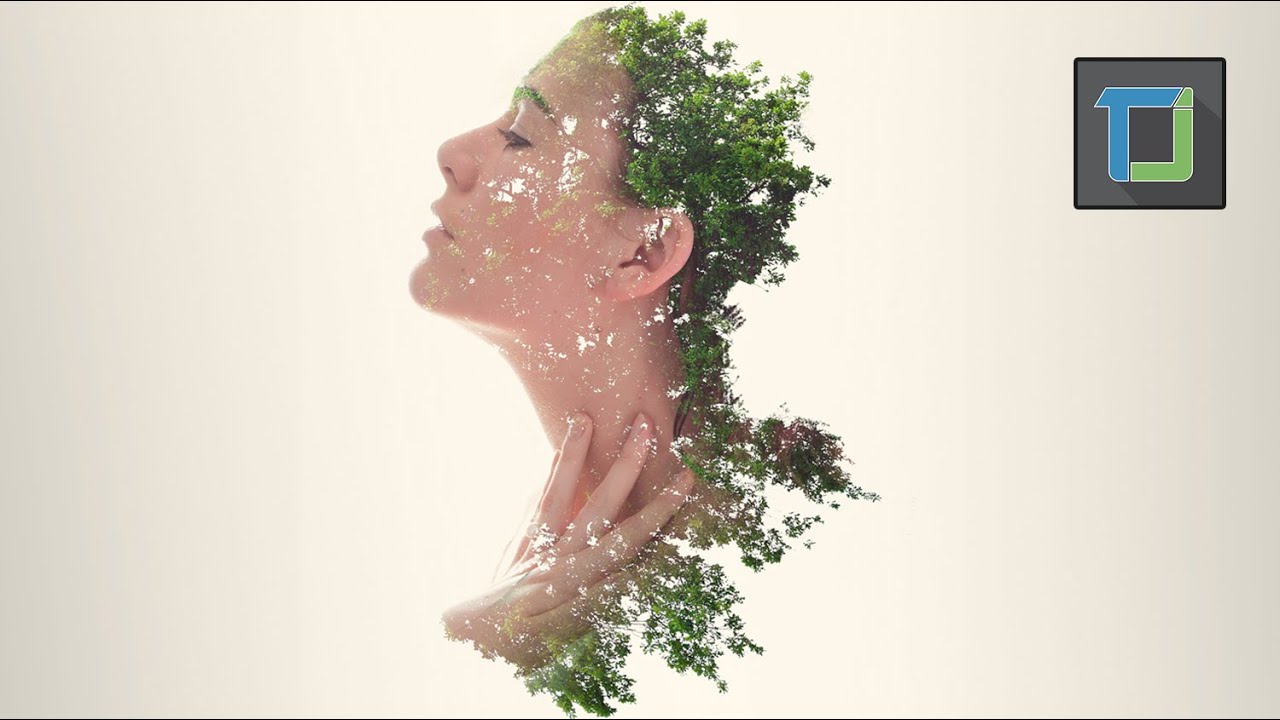
A double exposure is traditionally done using a film camera by taking two different photos on the same exposure of film. The images will combine in unique ways, giving you the "double exposure" effect.

We were asked to create a double exposure and we decided to take it a step further. In this tutorial you will learn how to combine multiple photos together as well as create a unique piece of art.

Choosing images for your double exposure

It is important to choose the right images for your double exposure. You will want to choose images that have a high contrast between light and dark. In this case we chose flowers that were photographed on a white background and a subject that was photographed on gray(which we cut out using a layer mask in Photoshop)

Because we are completing this effect in Photoshop there are no restrictions when it comes to what images you will combine. With endless possibilities it seems appropriate to choose objects that have some relationship with one another. In this case we choose a young, well-dressed woman to pair with flowers. You can also use "opposites" or images that will tell a story when combined.

Blending Images

The real key to creating a double exposure is to combine your images together using Blending Modes in Photoshop. I would recommend flipping through the different blending modes in Photoshop to see which modes will work best for your image. It is also a good idea to change the layer order of the images. A few good blending modes to experiment with are Screen, Multiply, Lighten, Soft Light, and Overlay.

In this tutorial we use a Lighten blending mode on our subject over top of flowers.

Layer Masking for Added Effect

After we blend our images together using blending modes we jump into using layer masks for added effect. In this case I wanted to have part of the subject's hat defined by flowers. To do so I created a selection of the subject cut out from her background and loaded it onto a duplicate layer of flowers. Then I sized the flowers to fill up the space of the hat.

Next I used another duplicate of the flower layer to fill in an area of her face where there were no flowers. Because we are using a Lighten blending mode on the subject, she will not show up unless there is a dark area underneath (such as the flowers).

Coloring the Image

After the double exposure is complete we add some color to the image to make it a bit more interesting. To add some color to the white background we use a Levels Adjustment Layer. Use the lower sliders that control the Output Levels, bringing the "white point" down on the different color channels. In this image we adjust the Green and Blue Channels to give the image a bit of an orange color to match the flowers.

Then we use a Hue/Saturation Adjustment Layer to add a complimentary color to the outer edges of the image. Using the Colorize button on the adjustment layer allows us to create any color we desire. From here all you have to do is use a layer mask to define where you would like this color to be visible.


VISIT PHLEARN.COM FOR MORE FREE TUTORIALS
https://phlearn.com

SUBSCRIBE TO OUR CHANNEL FOR MORE FREE TIPS AND TRICKS
http://www.youtube.com/subscription_c...

GET FREE TUTORIALS IN YOUR EMAIL + DISCOUNTS ON OUR PRO TUTORIALS!
https://phlearn.com/mail

BUY THE TABLET AARON USES! https://phlearn.com/tablet

LET'S BE FRIENDS!
Instagram ►   / phlearn  
Facebook ►   / phlearn  
Twitter ►   / phlearn  
Google+ ► https://plus.google.com/1167910980592...
Phlearn ► https://phlearn.com

Комментарии

Информация по комментариям в разработке

Похожие видео

  • Double Exposure Effect Photoshop Tutorial
    Double Exposure Effect Photoshop Tutorial
    6 лет назад
  • Этот трюк в Lightroom мгновенно делает фотографии более резкими.
    Этот трюк в Lightroom мгновенно делает фотографии более резкими.
    2 недели назад
  • BETTER way to do Double Exposure effect in Photoshop
    BETTER way to do Double Exposure effect in Photoshop
    3 года назад
  • Create an Eye-Catching Double Exposure Effect in Photoshop
    Create an Eye-Catching Double Exposure Effect in Photoshop
    1 год назад
  • 7 Signs You’re a Photoshop Pro (Your Scorecard)
    7 Signs You’re a Photoshop Pro (Your Scorecard)
    1 день назад
  • Как освоить инструмент «Штамп» в Photoshop
    Как освоить инструмент «Штамп» в Photoshop
    11 лет назад
  • Альфред Кох – Путин 1990-х, бандиты, НТВ, Навальный / вДудь
    Альфред Кох – Путин 1990-х, бандиты, НТВ, Навальный / вДудь
    12 часов назад
  • Double Exposure Effect - Photoshop Tutorial (Easy)
    Double Exposure Effect - Photoshop Tutorial (Easy)
    3 года назад
  • Оборона Графского Рухнула💥Битва За Константиновку И Запорожье⚔️📈Военные Сводки За 25.02.2026
    Оборона Графского Рухнула💥Битва За Константиновку И Запорожье⚔️📈Военные Сводки За 25.02.2026
    4 часа назад
  • Creative Double Exposure Effect - Photoshop Tutorial
    Creative Double Exposure Effect - Photoshop Tutorial
    4 года назад
  • Популярные музыканты Баста и Киркоров — влипли. Теперь им такое не простят, попали в списки опалы
    Популярные музыканты Баста и Киркоров — влипли. Теперь им такое не простят, попали в списки опалы
    6 часов назад
  • Double Exposure: Creative Photography Challenge #8
    Double Exposure: Creative Photography Challenge #8
    9 лет назад
  • How to make Double Exposur in Photoshop | Double Exposure Collection | Photoshop Tutorial
    How to make Double Exposur in Photoshop | Double Exposure Collection | Photoshop Tutorial
    1 год назад
  • Урок по Photoshop: Как создать изображение с двойной экспозицией в Photoshop
    Урок по Photoshop: Как создать изображение с двойной экспозицией в Photoshop
    10 лет назад
  • Двойная экспозиция в фотошопе
    Двойная экспозиция в фотошопе
    9 лет назад
  • Про ТЦК не знаю. Я помогаю своим мозгом. Опрос из Берлина
    Про ТЦК не знаю. Я помогаю своим мозгом. Опрос из Берлина
    4 часа назад
  • Это ИЗМЕНИЛО мой подход к редактированию... Изучите кривые Lightroom за 20 минут
    Это ИЗМЕНИЛО мой подход к редактированию... Изучите кривые Lightroom за 20 минут
    2 года назад
  • 10 Photoshop Tricks to Not Ruin Social Media Photos!
    10 Photoshop Tricks to Not Ruin Social Media Photos!
    1 год назад
  • Эффект двойной экспозиции | урок по Photoshop
    Эффект двойной экспозиции | урок по Photoshop
    10 лет назад
  • Как я редактирую плоские, скучные фотографии птиц, сделанные в пасмурные дни (урок по Lightroom)
    Как я редактирую плоские, скучные фотографии птиц, сделанные в пасмурные дни (урок по Lightroom)
    3 дня назад
  • О нас
  • Контакты
  • Отказ от ответственности - Disclaimer
  • Условия использования сайта - TOS
  • Политика конфиденциальности

video2dn Copyright © 2023 - 2025

Контакты для правообладателей video2contact@gmail.com