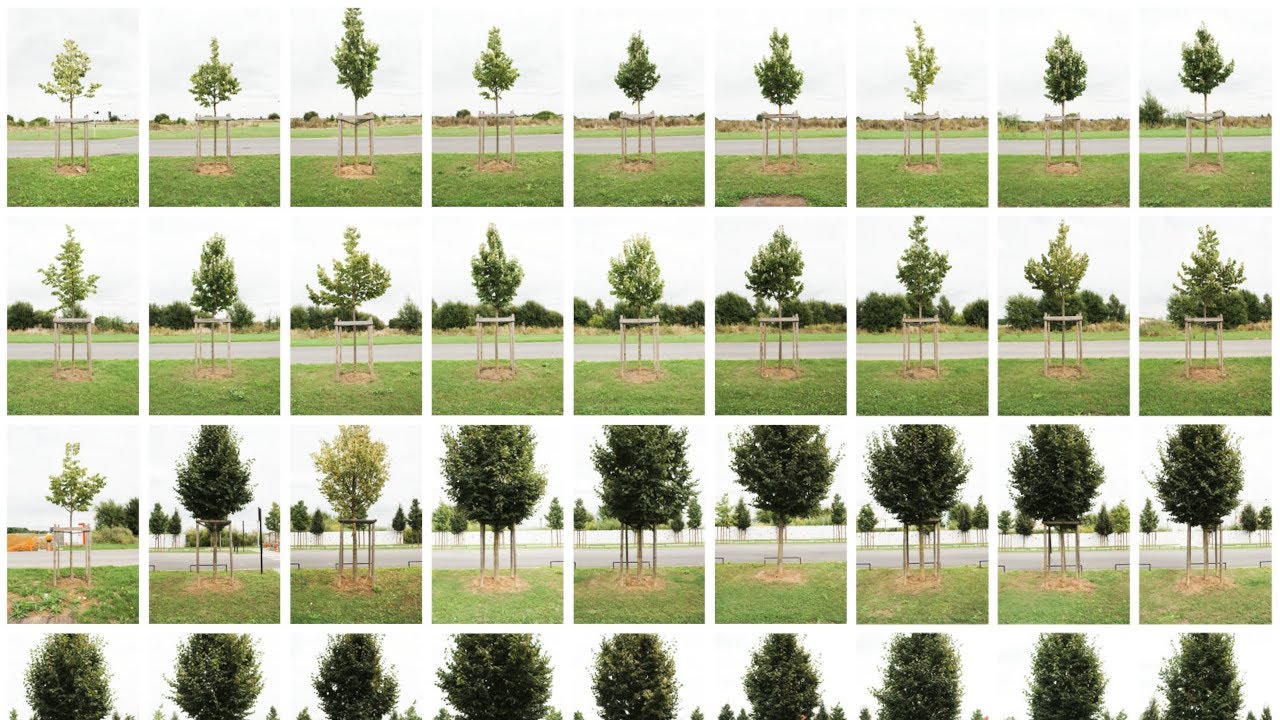
For this series titled "Pattern Recognition" I converted a long series of images to sounds. This contemporary art project also includes still photographs in the form of montages made of each street.
This video represents just one of many possible derivatives of the source material. The photos themselves are intended to be viewed in real life, either as part of large-scale montages, or as individually framed prints arranged in order.
In an earlier experiment I decided to take the Ten Commandments and to pass them through Google Translate via every possible language from English and back again, to see how the translation process would affect them. During this process it was evident that there were many opportunities for errors to arise which would simply become compounded as the process continued to play out.
Another idea I have, of which this video is a first iteration, is to take an image for example, and to pass it through various processes in succession. For example, an image can be changed/translated/re-interpreted as a sound, and likewise a sound can be processed to become an image using similar software. Colours on a computer are represented by numbers, numbers can be represented by letters or positions and so on, an image being printed produces a sound which can be recorded and used to represent that unique event.
Each process has its own characteristics which influence the final output, as well as our experience of the information which has been processed and is being presented – digital photography uses the presence of photons in order to induce a unique combination of binary numbers inside a computer, which can then present this information visually. Behind the press of a button and the click of a shutter, there are all manner of abstractions and computations going on without our awareness of them. And likewise, this is true of our own perception of the world.
I have deliberately created thousands of abstractions, each an abstraction in itself, and combined them into video form (another abstraction), and then uploaded it to Youtube where it has undergone further degradation, and perhaps more importantly, it has been released into an entirely different environment.
The importance of environment or chosen medium becomes increasingly apparent when one works across multiple platforms and means of expression, ranging from the written (typed) word, to the printed image. For example, the default view on Youtube places the video slightly to the left of the screen, which in turn effects the feeling of ‘balance’ in the video, which consequently caused me to switch the positioning of the images, so that now the JPEG is on the left with the pixelated equivalent on the right.
The post-production work behind this video is much greater than the many hours I spent taking the original photographs, although ironically, the time spent creating this piece was dramatically reduced by certain software that allowed me to automate many of the repetitive tasks that made up the bulk of the work. Before I discovered this software however, while clicking almost endlessly with the right button on my tired mouse, it occurred to me that in order to produce a piece intended to be a reflection on filtering effects and the characteristics of a medium, I would have to become machine-like myself. In the end though, my repetitive interventions were only necessary insofar as beginning or restarting the the software that I had programmed to do the real work for me.
Beginning with the raw files taken from the camera I then processed them using Adobe CameraRaw in order to give a full-size reproduction in JPEG format. A copy of this JPEG file was then resized in order to save rendering time, as each of the 732 total images would then have to be processed with AudioPaint in order to produce an equivalent WAV file for each. The full-size JPEGS were also reduced to a size of 6×9 pixels before saving a further copy at this size. The colours from each 6×9 image were then copied and pasted one by one into a template made of 6×9 squares, although with a total size of 635×950 pixels. This reproduction was then saved as a PNG file which can then be infinitely scaled up or down without detriment to its appearance. If I had manually created each PNG file using the mouse only and without ever making a mistake, the minimum amount of clicks it would take would be around 158112 – 4 clicks to select a single colour, to change the tool and to paste into the template, repeated 54 times to fill each square in the 6×9 template, repeated 732 times for each image in the series.
If a tree falls in the woods and nobody is around to record the resulting soundwaves, they will have no digital equivalent.
The size of a real tree is approximately 0 kb.
https://eightyeightdays.com/to-succee...

Информация по комментариям в разработке