Logo video2dn
  • Сохранить видео с ютуба
  • Категории
    • Музыка
    • Кино и Анимация
    • Автомобили
    • Животные
    • Спорт
    • Путешествия
    • Игры
    • Люди и Блоги
    • Юмор
    • Развлечения
    • Новости и Политика
    • Howto и Стиль
    • Diy своими руками
    • Образование
    • Наука и Технологии
    • Некоммерческие Организации
  • О сайте

Скачать или смотреть SAP Sales Orders on Hold Learn to Review Blocked Orders Like a Pro! 🚦

  • S4HCLUB - Learning SAP
  • 2025-03-02
  • 150
SAP Sales Orders on Hold   Learn to Review Blocked Orders Like a Pro! 🚦
SAP
  • ok logo

Скачать SAP Sales Orders on Hold Learn to Review Blocked Orders Like a Pro! 🚦 бесплатно в качестве 4к (2к / 1080p)

У нас вы можете скачать бесплатно SAP Sales Orders on Hold Learn to Review Blocked Orders Like a Pro! 🚦 или посмотреть видео с ютуба в максимальном доступном качестве.

Для скачивания выберите вариант из формы ниже:

  • Информация по загрузке:

Cкачать музыку SAP Sales Orders on Hold Learn to Review Blocked Orders Like a Pro! 🚦 бесплатно в формате MP3:

Если иконки загрузки не отобразились, ПОЖАЛУЙСТА, НАЖМИТЕ ЗДЕСЬ или обновите страницу
Если у вас возникли трудности с загрузкой, пожалуйста, свяжитесь с нами по контактам, указанным в нижней части страницы.
Спасибо за использование сервиса video2dn.com

Описание к видео SAP Sales Orders on Hold Learn to Review Blocked Orders Like a Pro! 🚦

SAP Sales Orders on Hold? Learn to Review Blocked Orders Like a Pro! 🚦

Ever see a sales order stuck in SAP with a "credit block"? Don't worry, it's part of SAP's smart credit management! Here's how to easily review these blocked orders and get things moving again:

Why are Sales Orders Blocked? 🤔

Sales orders get blocked because SAP's automatic credit check detected a potential risk. This usually happens when the order value exceeds the customer's credit limit, or if there are other payment concerns.

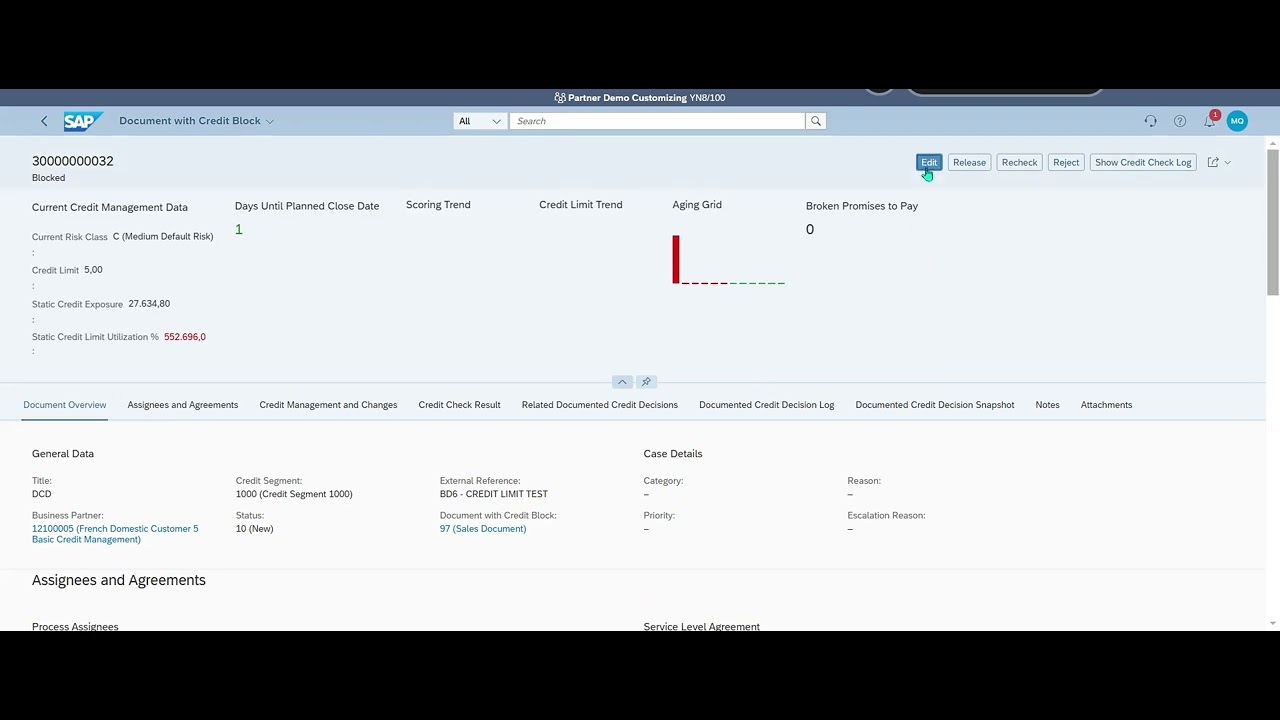
Reviewing a Blocked Sales Order in SAP Fiori (Simplified Steps):

1. Log in to SAP Fiori as a Credit Controller.
2. Open the "Manage Documented Credit Decisions" App. This is your central hub for handling credit blocks!
3. Search for the Customer: Enter the "Business Partner" number and "Credit Segment" to find the relevant blocked order.
4. Select the "Documented Credit Decision": Choose the specific case you need to review from the list.
5. Check the "Credit Case" Details: Make sure:
The "Status" is "In Processing". This means it's currently being reviewed.
A "Credit Analyst" and "Person Responsible" are assigned. This ensures someone is taking ownership of the review.
6. Need to Update? Click "Edit": If the status or assigned people are incorrect, simply click "Edit" to make changes.
7. "Save" your Updates!

Why Review Blocked Orders? ✅

Understand the Credit Situation: Get insights into why the order was blocked and the customer's credit status.
Take Action: Decide whether to release the order (if you're confident in payment) or reject it (if the risk is too high).
Keep Sales Moving: Promptly review and resolve blocked orders to avoid delays in the sales process.

Reviewing blocked sales orders in SAP is key to balancing sales efficiency with smart credit risk management!

#SAP #SalesOrders #CreditManagement #SAPFiori #BlockedOrders #SalesProcess #SAPSD #LinkedInLearning #CreditControl

Комментарии

Информация по комментариям в разработке

Похожие видео

  • О нас
  • Контакты
  • Отказ от ответственности - Disclaimer
  • Условия использования сайта - TOS
  • Политика конфиденциальности

video2dn Copyright © 2023 - 2025

Контакты для правообладателей [email protected]