Logo video2dn
  • Сохранить видео с ютуба
  • Категории
    • Музыка
    • Кино и Анимация
    • Автомобили
    • Животные
    • Спорт
    • Путешествия
    • Игры
    • Люди и Блоги
    • Юмор
    • Развлечения
    • Новости и Политика
    • Howto и Стиль
    • Diy своими руками
    • Образование
    • Наука и Технологии
    • Некоммерческие Организации
  • О сайте

Скачать или смотреть Let's Try to Repair My Galaxy S5 Charger Port

  • Hotshot Repair
  • 2017-10-08
  • 22626
Let's Try to Repair My Galaxy S5 Charger Port
galaxy s5 charger portgalaxy s5 charger port repair
  • ok logo

Скачать Let's Try to Repair My Galaxy S5 Charger Port бесплатно в качестве 4к (2к / 1080p)

У нас вы можете скачать бесплатно Let's Try to Repair My Galaxy S5 Charger Port или посмотреть видео с ютуба в максимальном доступном качестве.

Для скачивания выберите вариант из формы ниже:

  • Информация по загрузке:

Cкачать музыку Let's Try to Repair My Galaxy S5 Charger Port бесплатно в формате MP3:

Если иконки загрузки не отобразились, ПОЖАЛУЙСТА, НАЖМИТЕ ЗДЕСЬ или обновите страницу
Если у вас возникли трудности с загрузкой, пожалуйста, свяжитесь с нами по контактам, указанным в нижней части страницы.
Спасибо за использование сервиса video2dn.com

Описание к видео Let's Try to Repair My Galaxy S5 Charger Port

https://www.hotshot.repair/mo/columbia/

My Samsung Galaxy S5 charger port was on the fritz.  It would lose connection rather often, and then reconnect, and then disconnect again.  It was getting frustrating.  Rather than throw my phone at the wall, I decided to take a chance and try to put a bandaid on the situation.

Replacing the charger port in a Samsung Galaxy S5, can be dangerous.  Samsung, in their infinite wisdom, have decided to adhere the back of the AMOLED screen to the middle frame beneath it.  The adhesive they use is pretty strong, and I have not had a lot of luck getting a screen off of a Galaxy S5 without breaking the LCD in the process.  Replacing the display on the Galaxy S5 can be rather expensive, at around $115 or so.  I would rather not spend this money, if I don't have to.

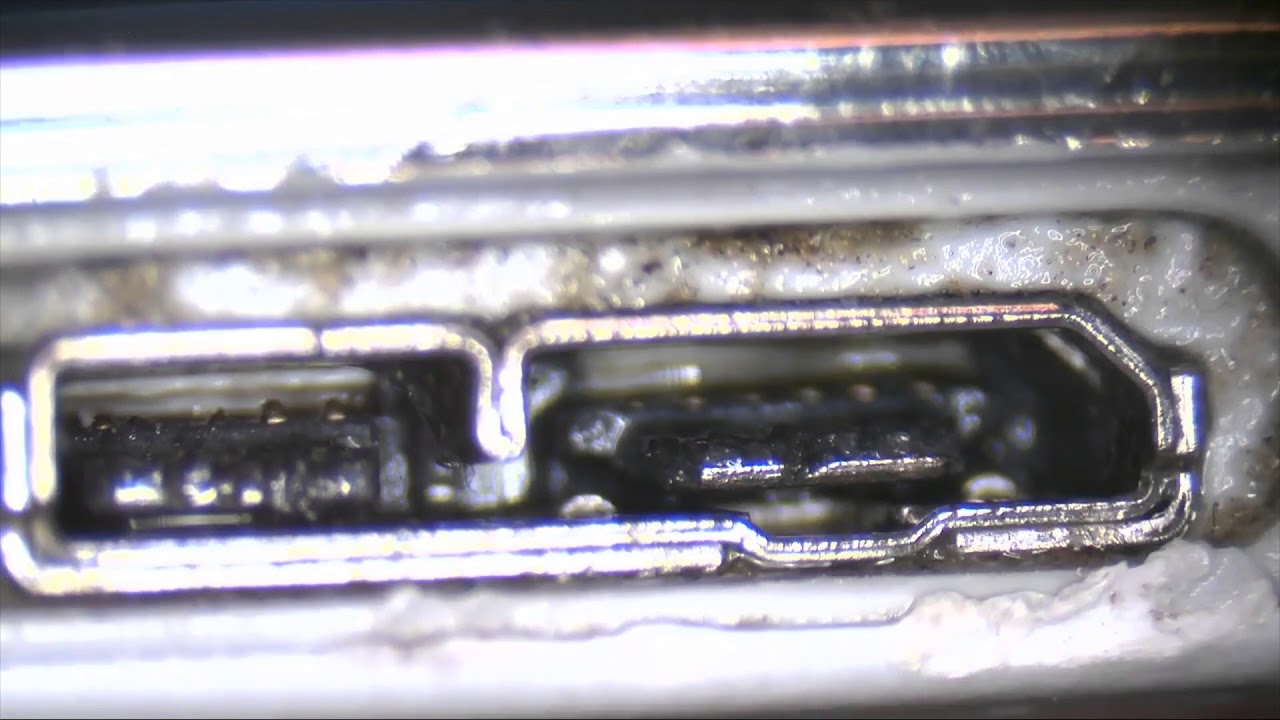
In a fit of desperation I decided to see if the connection issue was external to the phone, or internal.  Is the problem is on the pins on the inside of the charger port, or is the problem with the pins soldered to the logic board.

My idea was to put a layer of solder on the pins in the USB port, and see if that would solve the problem.

To this end, I readied my soldering iron, and got to work.

I began on the left hand side of the usb port, as it is the ancillary USB 3.0 part.  I could still charge the phone with the other side if I screwed up this section.  I feel like I made quite a mess of this side, with the soldering iron melting the plastic under the metal pins.  Nevertheless, I moved on to the other side.

After all was said and done, I cleaned the USB port with alcohol, and blew the charger port clean.

As I tested the phone I held my breath.  Hopefully the phone would still charge, as I would have to wait several days to get a new charger port, and probably have to spend extra money on a new display.

As I tested the phone, all seemed will.  The phone charges and keeps charging.  Data transfer seems to be unaffected, as it still connects to my computer fine.  Hopefully this bandaid will hold for a while, and save me from having to throw money into this phone.  I would rather just replace it, then put more repairs into it.

If you are having a problem with your phone, I can probably help you out too.  Send me a message, and let me know if you need any thing.

Комментарии

Информация по комментариям в разработке

Похожие видео

  • О нас
  • Контакты
  • Отказ от ответственности - Disclaimer
  • Условия использования сайта - TOS
  • Политика конфиденциальности

video2dn Copyright © 2023 - 2025

Контакты для правообладателей [email protected]