A budget smartphone with a large screen, decent processor, average resolution. However, the construction is not long lasting and it physically started to breakdown after less than 1 year of use. Amazon Affiliate Product Link: http://amzn.to/28Vc2oj
You’ll receive the phone, a 40” microUSB cable, and a power adapter. The phone looks similar to Samsung Galaxy S series phones and comes with a pre-installed PET film screen protector. The screen has a 5.5” diagonal with a 1280 x 720px resolution. Along the bottom are your standard physical Android touch keys for recent apps, home, and back. Along the top you have the 2MP front camera, speaker, and flash, then along the bottom you have the speakerphone grills and charging port. At the base of the screen is the microphone. The sides of the phone are wrapped in a chromed metal aluminum and there’s a headphone port at the top. Along the right-hand-side you have the power button and volume rocker. On the back you have the 13MP rear camera and flash; the UMI logo is printed just below that and the model name Rome X appears at the bottom. The back plate of the phone is made of a thin hardshell plastic with a smooth matte finish.
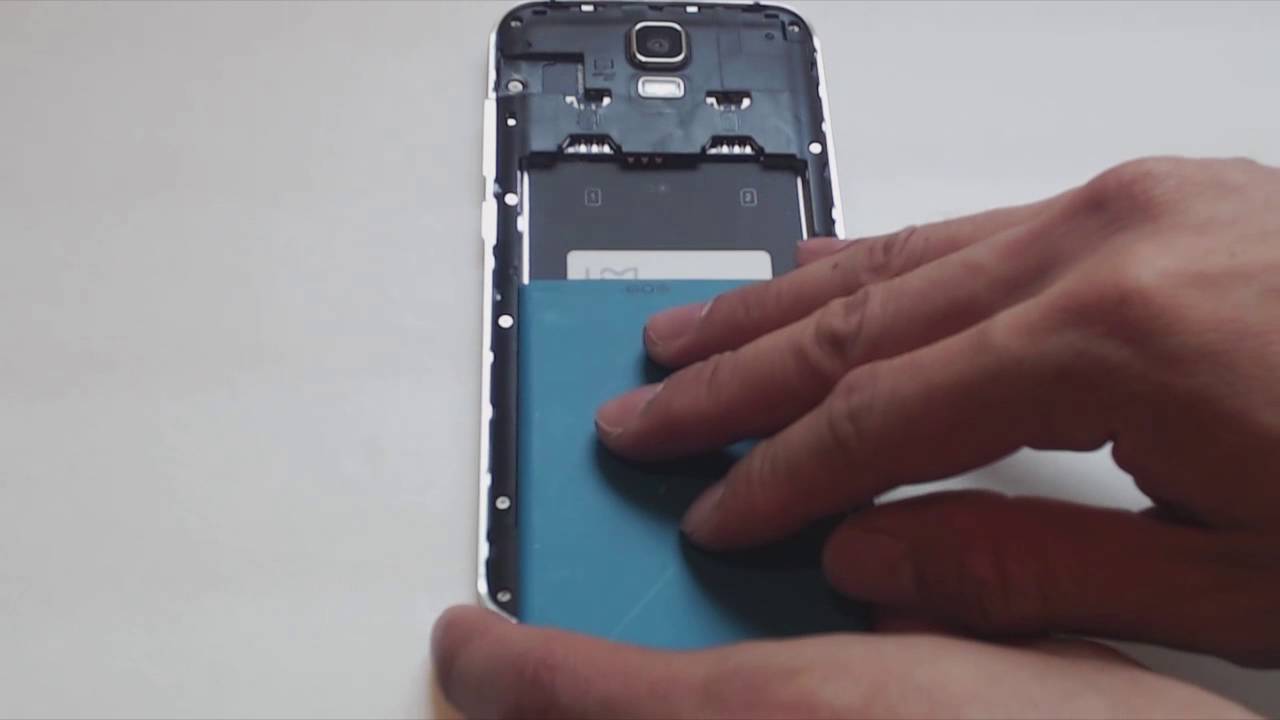
I wasn’t so impressed with the pre-installed screen protector because it’s quite the fingerprint magnet and the alignment was slightly off. I'll likely remove it and replace with a glass one. The volume and power keys also feel a bit loose in the housing and wiggle around somewhat. Other than that, the phone feels pretty solidly built with a nice weight, thickness, and proportion. To open the back plate to install the battery, SIM cards and SD card, in the bottom left corner there is a little notch for you to pry up the back with your fingernail. It does take a bit more forceful pulling than I was comfortable with because I thought I might snap or break the back plate, but it did come off in one piece. Make sure to remove the plastic sticker over the battery contacts after you first receive the phone so that it can power the phone. To access the two SIM card slots, you have to remove the battery. This setup allows you to use up to two SIM cards for example, one for work and one for personal use or travel internationally. There’s a microSD card slot for expandable memory up to 64 GB (not included). Make sure your SIM card is the correct size, micro SIM; a mini SIM card and nano SIM card will not fit the slot. When plugging in the microUSB charging cable the first time, it did feel slightly misaligned, though once I got the connector in, it went in easily after that.
Press and hold the power button to turn the phone on. The phone takes about 25 seconds to boot up which is a bit sluggish. You’ve got a typical Android home screen and this phone supports Wifi, Bluetooth and GPS. The Umi button in the quick launch bar brings up the app drawer and overall the phone is quite responsive and loads apps quickly. The camera quality for both front and back camera were decent, but not amazing. For me, the compression on the video kills the quality and it has a tendency to look slightly overexposed. However, the photos do come out nice and clear with crisp details. Despite that, I think this is a pretty decent budget level Android smartphone. The screen has an acceptable resolution with average camera quality, operating speed, and functionality. I did notice that the phone gets quite warm after prolonged use and during charging, so that’s something to keep an eye on and be aware of. It's great for folks new to Android, smartphone beginners, or as a spare travel phone with smart capabilities.
Amazon Affiliate Product Link: http://amzn.to/28Vc2oj

Информация по комментариям в разработке