Logo video2dn
  • Сохранить видео с ютуба
  • Категории
    • Музыка
    • Кино и Анимация
    • Автомобили
    • Животные
    • Спорт
    • Путешествия
    • Игры
    • Люди и Блоги
    • Юмор
    • Развлечения
    • Новости и Политика
    • Howto и Стиль
    • Diy своими руками
    • Образование
    • Наука и Технологии
    • Некоммерческие Организации
  • О сайте

Скачать или смотреть 3DS Max Training | Commands Explained: Move, Rotate, Scale

  • CAD GURU (Sujeet Kumar)
  • 2025-08-22
  • 13
3DS Max Training | Commands Explained: Move, Rotate, Scale
3DS MaxMove CommandRotate CommandScale Command3DS Max Basics3D Modeling TrainingInterior Design SoftwareCAD Guru3DS Max TutorialBeginner 3DS MaxLearn 3DS Max3D Design SkillsObject Transformation 3DS Max
  • ok logo

Скачать 3DS Max Training | Commands Explained: Move, Rotate, Scale бесплатно в качестве 4к (2к / 1080p)

У нас вы можете скачать бесплатно 3DS Max Training | Commands Explained: Move, Rotate, Scale или посмотреть видео с ютуба в максимальном доступном качестве.

Для скачивания выберите вариант из формы ниже:

  • Информация по загрузке:

Cкачать музыку 3DS Max Training | Commands Explained: Move, Rotate, Scale бесплатно в формате MP3:

Если иконки загрузки не отобразились, ПОЖАЛУЙСТА, НАЖМИТЕ ЗДЕСЬ или обновите страницу
Если у вас возникли трудности с загрузкой, пожалуйста, свяжитесь с нами по контактам, указанным в нижней части страницы.
Спасибо за использование сервиса video2dn.com

Описание к видео 3DS Max Training | Commands Explained: Move, Rotate, Scale

Learn essential 3DS Max commands – Move, Rotate, Scale and more. Master object transformation for accurate modeling in interior design.

1. Move Command

👉 Used to shift an object from one place to another.
Steps:

Select the object.

Go to the Main Toolbar → Click Move tool (or press W).

Gizmo arrows (X, Y, Z axis) will appear.

Drag along the required axis or enter values in the Coordinate box.

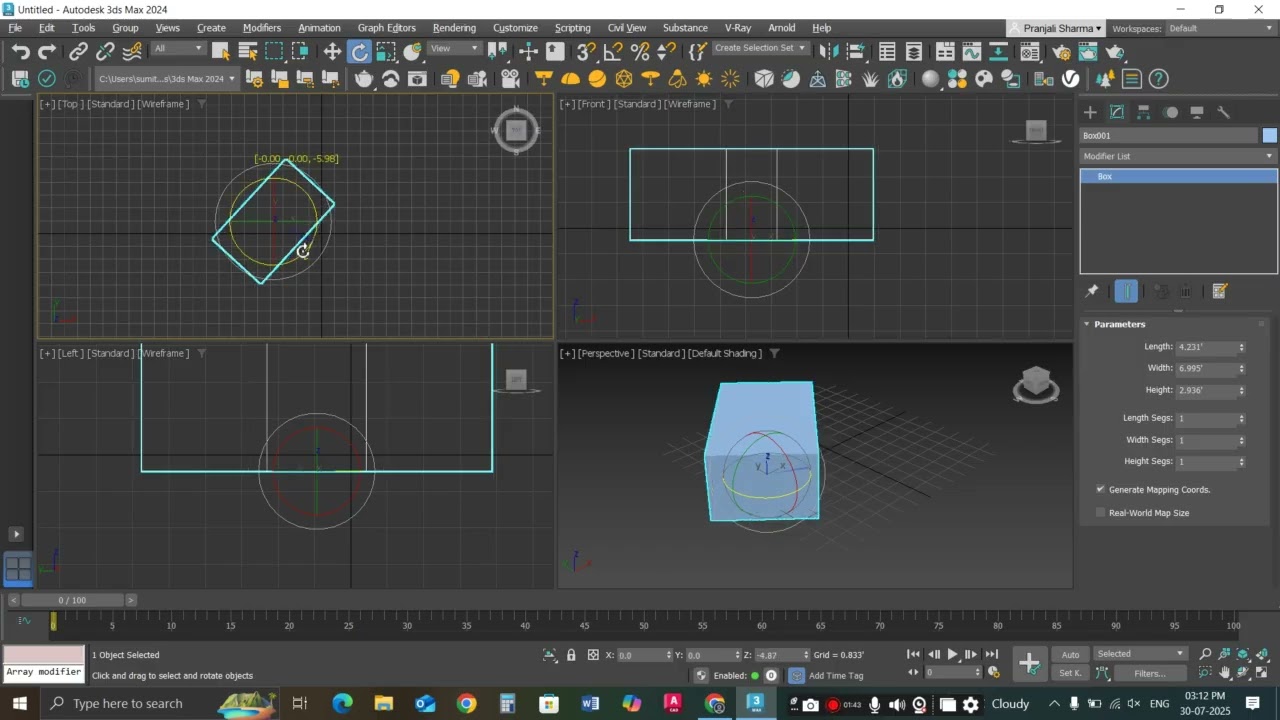
2. Rotate Command

👉 Used to rotate an object around an axis.
Steps:

Select the object.

On the Toolbar, click Rotate tool (or press E).

A rotation gizmo (colored circles) will appear.

Drag along X, Y, or Z axis, or input angle values.

3. Scale Command

👉 Used to resize an object (uniformly or non-uniformly).
Steps:

Select the object.

Click Scale tool (or press R).

Gizmo handles appear – drag to resize on X, Y, Z, or uniformly.

Enter scaling percentages in the transform box for accuracy.

✅ Tip for Students:

W = Move, E = Rotate, R = Scale → quick shortcuts to save time.

Always keep an eye on the axis constraints to avoid distortion.

#3DSMax #3DModeling #CADTraining #InteriorDesign #3DSMaxTraining #3DVisualization #DesignSkills #cadguru #delhi #BAStudents #BachelorOfArts #CareerAfterBA #LifeAfterBA #BAOpportunities #ArtsToCareer #LearnCAD #CADDrafting #DesignSkills #InteriorDesignCourse #AutoCADTraining #DesignYourFuture #CreativeDesign #3DPrintingTraining #FutureTechnology #AdditiveManufacturing #3DDesignSkills #TechForStudents #DigitalFabrication #SkillBasedLearning #JobReadySkills #CareerGrowth #PracticalTraining #IndustrySkills #LearnAndEarn #TransformYourCareer #FromArtsToDesign #UpgradeYourSkills #CreativeCareerPath #FutureReady

Комментарии

Информация по комментариям в разработке

Похожие видео

  • О нас
  • Контакты
  • Отказ от ответственности - Disclaimer
  • Условия использования сайта - TOS
  • Политика конфиденциальности

video2dn Copyright © 2023 - 2025

Контакты для правообладателей [email protected]