Logo video2dn
  • Сохранить видео с ютуба
  • Категории
    • Музыка
    • Кино и Анимация
    • Автомобили
    • Животные
    • Спорт
    • Путешествия
    • Игры
    • Люди и Блоги
    • Юмор
    • Развлечения
    • Новости и Политика
    • Howto и Стиль
    • Diy своими руками
    • Образование
    • Наука и Технологии
    • Некоммерческие Организации
  • О сайте

Скачать или смотреть How to do NBDP Test to the Coast Station Step by step explained

  • pearlcity sailor
  • 2025-01-12
  • 1096
How to do NBDP Test to the Coast Station Step by step explained
  • ok logo

Скачать How to do NBDP Test to the Coast Station Step by step explained бесплатно в качестве 4к (2к / 1080p)

У нас вы можете скачать бесплатно How to do NBDP Test to the Coast Station Step by step explained или посмотреть видео с ютуба в максимальном доступном качестве.

Для скачивания выберите вариант из формы ниже:

  • Информация по загрузке:

Cкачать музыку How to do NBDP Test to the Coast Station Step by step explained бесплатно в формате MP3:

Если иконки загрузки не отобразились, ПОЖАЛУЙСТА, НАЖМИТЕ ЗДЕСЬ или обновите страницу
Если у вас возникли трудности с загрузкой, пожалуйста, свяжитесь с нами по контактам, указанным в нижней части страницы.
Спасибо за использование сервиса video2dn.com

Описание к видео How to do NBDP Test to the Coast Station Step by step explained

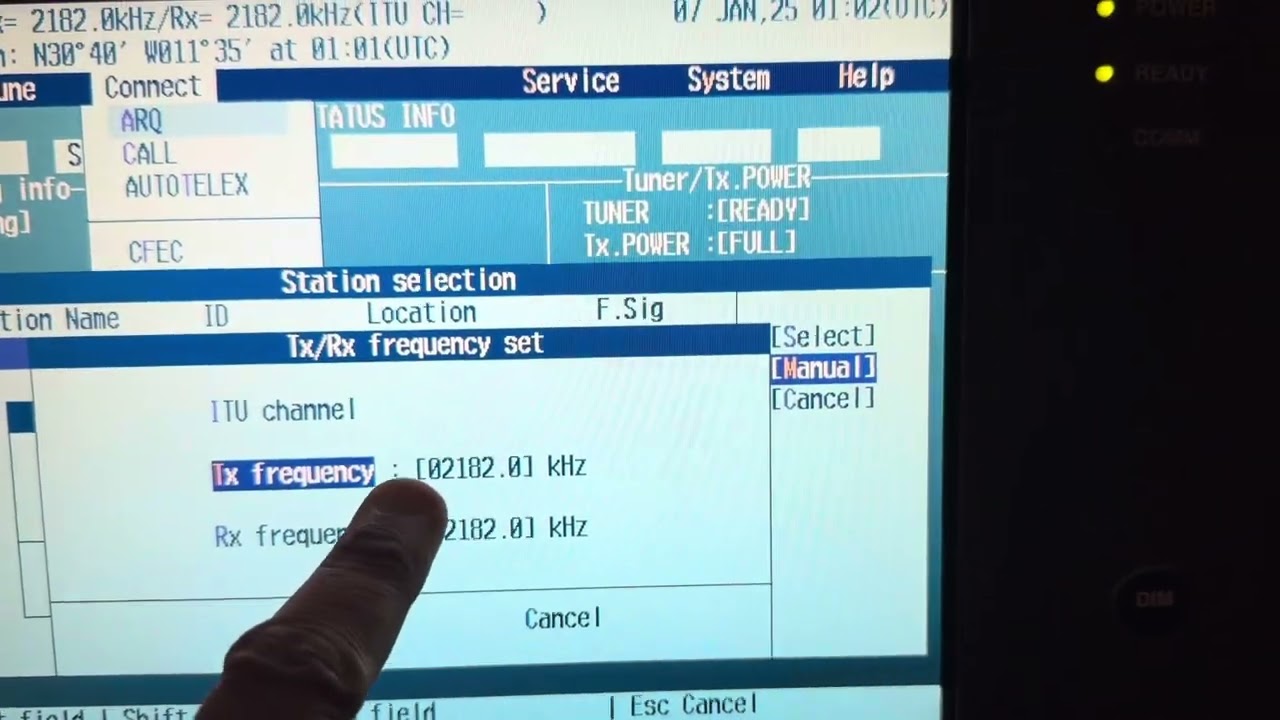
PROCEDURE TO MAKING NBDP TEST TO THE COAST STATION VIA TELEX in JRC (NCU-331 / NDZ-227)

1. Open Admiralty Digital Radio Signals 1,3,4,5
2. Type in the Search Box the Coast station name “ISTANBUL”
3. The Pop-up window will open with the Type / Address (Select the option Radio Station)
4. Once done note down the mentioned details (ISTANBUL (TAH) [4360])
5. Scroll down to the option Radio telex Services
Aerials
Transmits
Receives
Hours of Watch

4,216 kHz (Ch 413)
4,178.5 kHz
H24

4,560 kHz


8,431 kHz (Ch 830)
8,391 kHz
H24

12,624 kHz (Ch 1291)
12,522 kHz
H24

12,654 kHz (Ch 12151)
12,557 kHz
H24
6. After getting this all Information proceed to the NBDP Telex GMDSS CONSOLE
7. Press “ENTER” key to change into NBDP Mode
8. Scroll the Arrow keys and select the option “CONNECT” followed by “ARQ-Automatic Repeat Query” & Press Enter
9. And Select the Option “MANUAL” & Enter
10. Input the Station ID (4360) this is the ID for the Istanbul Coast Station & choose SET and Enter
11. In the next pop-up window input the ITU Channel to select the Transmit and Receive Freq automatically to avoid mistakes by inputting the values (ITU Ch mentioned in the Tabular Column for reference)
12. Once this step done the window will prompt with the message “Is the Frequency free now” Press “YES” and select “SET” option and Enter
• If we receive message from the coast station it will be in the following order in the monitor panel
• Message start….
• 4360 IST. RD
• Sent AAB- Our ship MMSI Number will display followed by Ship Name
• GA+? (Go Ahead) By the Coast Station
• Type (TEST+) & Enter – By Ship
• The quick brown fox jumps over the lazy dog & GA+? (By the Coast Station)
• Type (BRK+) & Enter – By ship to end the message
Once this done the following message will display in the monitor Message end…. Finally take the Printout Copy and keep as a record on GMDSS Files

Комментарии

Информация по комментариям в разработке

Похожие видео

  • О нас
  • Контакты
  • Отказ от ответственности - Disclaimer
  • Условия использования сайта - TOS
  • Политика конфиденциальности

video2dn Copyright © 2023 - 2025

Контакты для правообладателей [email protected]