Logo video2dn
  • Сохранить видео с ютуба
  • Категории
    • Музыка
    • Кино и Анимация
    • Автомобили
    • Животные
    • Спорт
    • Путешествия
    • Игры
    • Люди и Блоги
    • Юмор
    • Развлечения
    • Новости и Политика
    • Howto и Стиль
    • Diy своими руками
    • Образование
    • Наука и Технологии
    • Некоммерческие Организации
  • О сайте

Скачать или смотреть Replace Toner Brother MFC-L2960 DCP-L2600 MFC-L2800 TN-2510

  • viandant5
  • 2025-06-13
  • 5320
Replace Toner Brother  MFC-L2960 DCP-L2600 MFC-L2800 TN-2510
  • ok logo

Скачать Replace Toner Brother MFC-L2960 DCP-L2600 MFC-L2800 TN-2510 бесплатно в качестве 4к (2к / 1080p)

У нас вы можете скачать бесплатно Replace Toner Brother MFC-L2960 DCP-L2600 MFC-L2800 TN-2510 или посмотреть видео с ютуба в максимальном доступном качестве.

Для скачивания выберите вариант из формы ниже:

  • Информация по загрузке:

Cкачать музыку Replace Toner Brother MFC-L2960 DCP-L2600 MFC-L2800 TN-2510 бесплатно в формате MP3:

Если иконки загрузки не отобразились, ПОЖАЛУЙСТА, НАЖМИТЕ ЗДЕСЬ или обновите страницу
Если у вас возникли трудности с загрузкой, пожалуйста, свяжитесь с нами по контактам, указанным в нижней части страницы.
Спасибо за использование сервиса video2dn.com

Описание к видео Replace Toner Brother MFC-L2960 DCP-L2600 MFC-L2800 TN-2510

How to change toner cartridge Brother laser printers/multifunctions TN-2510 DCP‑L2600D / DCP‑L2620DW / DCP‑L2622DW / DCP‑L2627DW / DCP‑L2627DWXL / DCP-L2627DWE / DCP‑L2640DN / DCP‑L2660DW / DCP‑L2665DW / MFC‑L2802DN / MFC-L2800DW / MFC‑L2802DW / MFC‑L2827DWXL / MFC‑L2827DW / MFC‑L2835DW / MFC‑L2860DWE / MFC‑L2860DW / MFC‑L2862DW / MFC‑L2922DW / MFC-L2960DW / MFC-L2980DW

The machine must be turned on.
Open the front cover.
Remove the toner cartridge and drum unit assembly.
Push down the green lock lever, and take the toner cartridge out of the drum unit. This machine has two separate consumables. Toner cartridge, and drum unit. You have to change only the Toner.
Unpack the new toner cartridge.
Hold the toner cartridge by the handle and shake it from left to right several times.
Push the new toner into the old drum unit, until it locks into place.
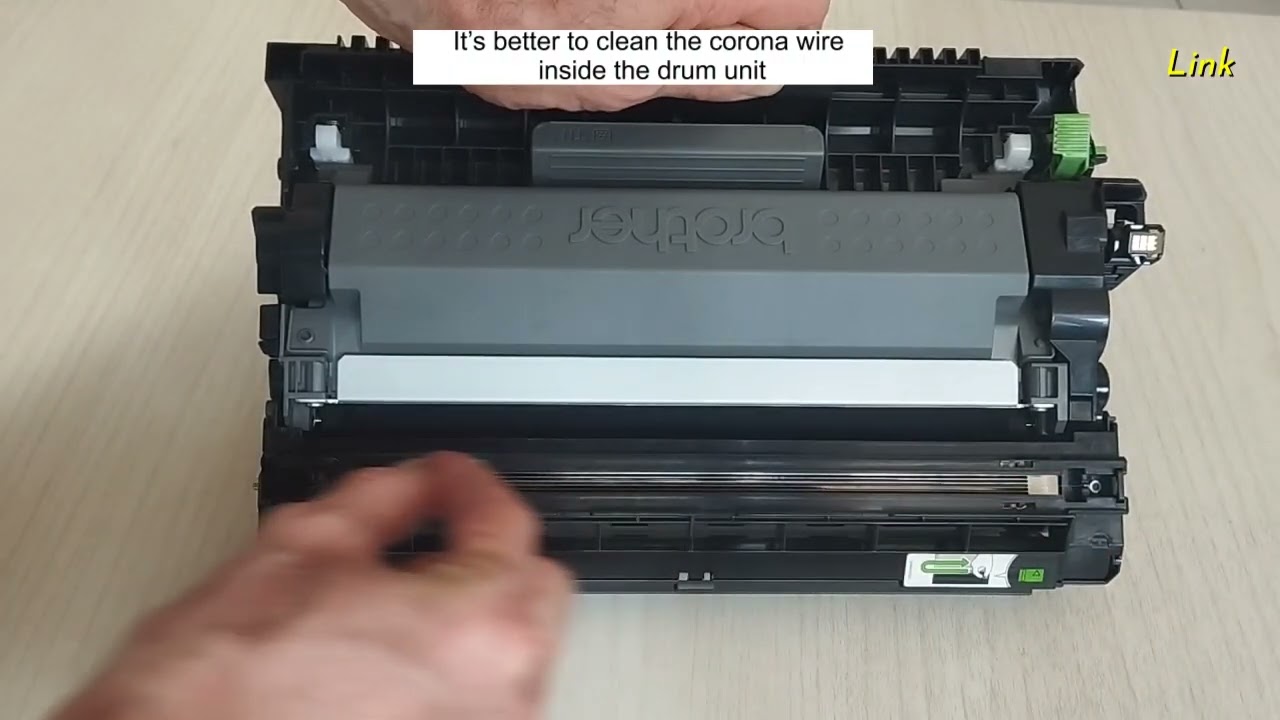
It’s better to clean the corona wire inside the drum unit, by gently sliding the green tab from left to right and right to left several times.
Be sure to return the green tab to the Home position, where there is the arrow.
Reinsert the toner cartridge and drum unit assembly back into the machine.
Close the front cover of the machine. Do not turn the machine off, or open the front cover, until the machine's display returns to Ready Mode.
The work is done.

Комментарии

Информация по комментариям в разработке

Похожие видео

  • О нас
  • Контакты
  • Отказ от ответственности - Disclaimer
  • Условия использования сайта - TOS
  • Политика конфиденциальности

video2dn Copyright © 2023 - 2025

Контакты для правообладателей [email protected]