Logo video2dn
  • Сохранить видео с ютуба
  • Категории
    • Музыка
    • Кино и Анимация
    • Автомобили
    • Животные
    • Спорт
    • Путешествия
    • Игры
    • Люди и Блоги
    • Юмор
    • Развлечения
    • Новости и Политика
    • Howto и Стиль
    • Diy своими руками
    • Образование
    • Наука и Технологии
    • Некоммерческие Организации
  • О сайте

Скачать или смотреть Connecting Fleischmann Piccolo curved turnouts in AnyRail

  • AnyRail DRail Software
  • 2020-04-14
  • 1467
Connecting Fleischmann Piccolo curved turnouts in AnyRail
  • ok logo

Скачать Connecting Fleischmann Piccolo curved turnouts in AnyRail бесплатно в качестве 4к (2к / 1080p)

У нас вы можете скачать бесплатно Connecting Fleischmann Piccolo curved turnouts in AnyRail или посмотреть видео с ютуба в максимальном доступном качестве.

Для скачивания выберите вариант из формы ниже:

  • Информация по загрузке:

Cкачать музыку Connecting Fleischmann Piccolo curved turnouts in AnyRail бесплатно в формате MP3:

Если иконки загрузки не отобразились, ПОЖАЛУЙСТА, НАЖМИТЕ ЗДЕСЬ или обновите страницу
Если у вас возникли трудности с загрузкой, пожалуйста, свяжитесь с нами по контактам, указанным в нижней части страницы.
Спасибо за использование сервиса video2dn.com

Описание к видео Connecting Fleischmann Piccolo curved turnouts in AnyRail

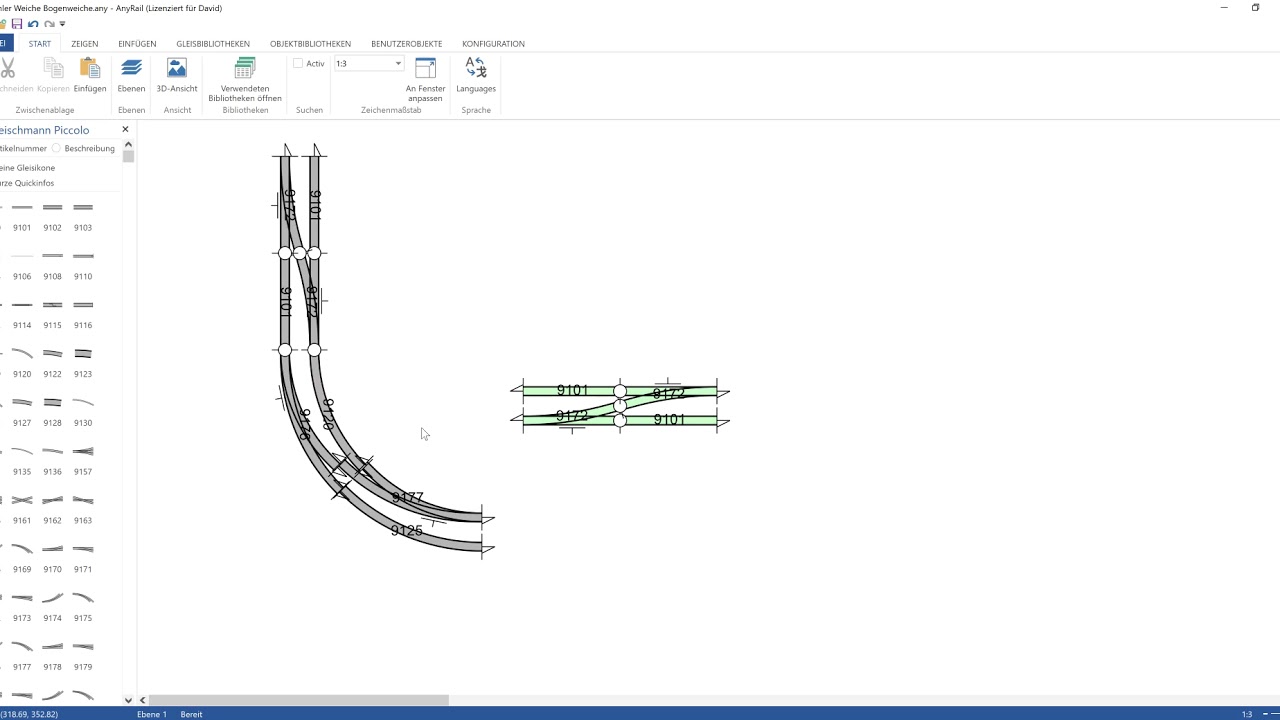
The problem is that Fleischmann has designed these curved turnouts in such a way that they can be used in various situations, but they never fit 100% accurately.


You have to use the natural play in the track.

Note that the user interface is in German for the occasion ;)

First, I make sure the number of decimals is increased. The track distance is 33.6 mm, and I want to make sure that this is displayed.
Then, I switch off 'Automatisch verbinden' (Autoconnect), to make sure connections at a slight angle or distance are allowed.

I remove the rectangles and then set the endpoints at convenient coordinates to line everything up.
The existing connections between the curved turnouts are removed.

I put the other endpoints in the correct position, derived from the track radius of 192 mm and 225.6 mm.

I selected the curved turnouts and moved them to make some space.
I copied the crossover, knowing it is at exactly 33,6mm track distance.
To make this connect correctly, the 'Automatisch verbinden' function needs to be switched on for a while.
Right-click an endpoint to connect it to a nearby other endpoint.

Knowing everything is in place, I switched off 'Automatisch verbinden' once again and disconnected the curved turnouts.

I rotated the curved turnouts just 1.5 degrees, and reconnected them.


Doing that, everything fits.


I understand it is a little bit annoying to work this way, but unfortunately the track is defined as it is, and Fleischmann relies on connections at a slight angle to make it fit.


You will find the same issue in any track program or CAD tool.

I hope this explains everything!

Комментарии

Информация по комментариям в разработке

Похожие видео

  • О нас
  • Контакты
  • Отказ от ответственности - Disclaimer
  • Условия использования сайта - TOS
  • Политика конфиденциальности

video2dn Copyright © 2023 - 2025

Контакты для правообладателей [email protected]