Logo video2dn
  • Сохранить видео с ютуба
  • Категории
    • Музыка
    • Кино и Анимация
    • Автомобили
    • Животные
    • Спорт
    • Путешествия
    • Игры
    • Люди и Блоги
    • Юмор
    • Развлечения
    • Новости и Политика
    • Howto и Стиль
    • Diy своими руками
    • Образование
    • Наука и Технологии
    • Некоммерческие Организации
  • О сайте

Скачать или смотреть How to Integrate Google Drive with Chipp AI Using Make

  • Chipp
  • 2026-01-16
  • 2
How to Integrate Google Drive with Chipp AI Using Make
  • ok logo

Скачать How to Integrate Google Drive with Chipp AI Using Make бесплатно в качестве 4к (2к / 1080p)

У нас вы можете скачать бесплатно How to Integrate Google Drive with Chipp AI Using Make или посмотреть видео с ютуба в максимальном доступном качестве.

Для скачивания выберите вариант из формы ниже:

  • Информация по загрузке:

Cкачать музыку How to Integrate Google Drive with Chipp AI Using Make бесплатно в формате MP3:

Если иконки загрузки не отобразились, ПОЖАЛУЙСТА, НАЖМИТЕ ЗДЕСЬ или обновите страницу
Если у вас возникли трудности с загрузкой, пожалуйста, свяжитесь с нами по контактам, указанным в нижней части страницы.
Спасибо за использование сервиса video2dn.com

Описание к видео How to Integrate Google Drive with Chipp AI Using Make

Learn how to give your Chipp AI agent the ability to search and retrieve documents from your Google Drive using Make.com as the integration layer.

What You'll Build

A custom action that lets users ask your Chipp AI agent to find files in Google Drive and return clickable links to the documents.

Steps Overview

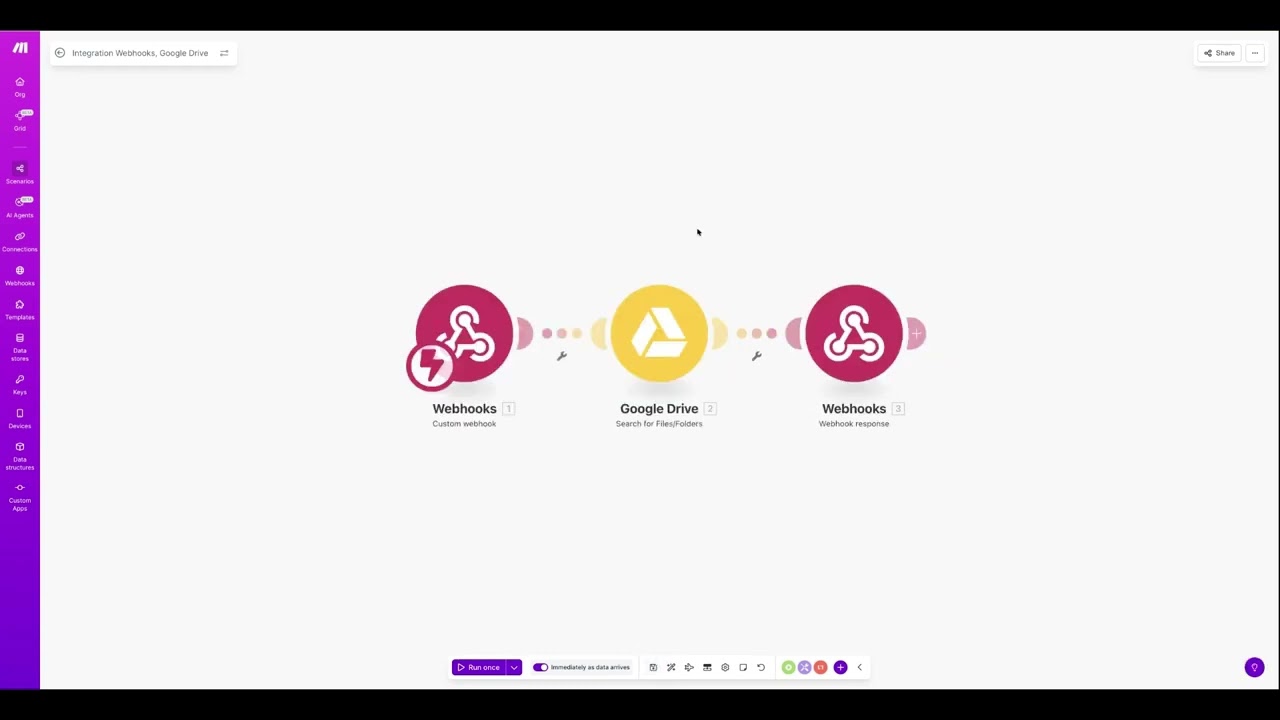
1. Create the Make Webhook
Log into Make.com → Create Scenario
Add Webhooks → Custom Webhook
Name it (e.g., "Google Drive Web")
Copy the webhook URL
Test using ReqBin.com:
Method: POST
Body (JSON): {"query": "test"}
Headers: Content-Type: application/json
Click Send
Return to Make and verify "data structure successfully determined"

2. Add Google Drive Module
Click + to add module → Search "Google Drive" → Select "Search for Files and Folders"
Create connection (sign in with Google)
Configure settings:
Method: Select from list
Drive: My Drive
Search Scope: Everywhere
Search: Within file/folder name
Query: Select the query variable from webhook
Limit: 50

Note: Google Workspace (business) accounts connect easily. Personal Google Drive accounts may require setting up a Google Cloud Console project with Client ID and Client Secret.

3. Add Webhook Response
Add module → Webhooks → Webhook Response
In Body, map these fields: name, mimeType, webViewLink
Save scenario
Toggle ON "Immediately as data arrives"
Name your scenario (e.g., "Chipp AI Google Drive Integration")

4. Configure Chipp Custom Action
Create a new app in Chipp
Go to Custom Actions → Add Custom Action
Title: Search My Drive
Description: Search Google Drive for files and documents
Method: POST
URL: Paste your Make webhook URL

Path Parameters:
Source: Let AI Generate
Key: query
Type: String
Example: "contract ABC Inc"
AI Instructions: "The search terms extracted from the user's request - exact keywords about what document they're looking for"
Required: ON

Body Parameters:
Source: Let AI Generate
Key: query
Type: String
Example: "proposal document"
AI Instructions: "The search query extracted from the user's request"

Headers:
Source: Fixed Value
Key: Content-Type
Type: String
Value: application/json

5. Add System Prompt
When a user asks to find files in their drive, immediately use search my drive with relevant keywords from their query. Format results as a clean list with clickable file names, file types, and modification dates. If no results are found, suggest trying different search terms or checking if the file might be elsewhere.

Result

Users can ask your agent things like "Find the ABC Inc contract" and receive a formatted list with clickable links to matching files in Google Drive.

Комментарии

Информация по комментариям в разработке

Похожие видео

  • О нас
  • Контакты
  • Отказ от ответственности - Disclaimer
  • Условия использования сайта - TOS
  • Политика конфиденциальности

video2dn Copyright © 2023 - 2025

Контакты для правообладателей [email protected]