Logo video2dn
  • Сохранить видео с ютуба
  • Категории
    • Музыка
    • Кино и Анимация
    • Автомобили
    • Животные
    • Спорт
    • Путешествия
    • Игры
    • Люди и Блоги
    • Юмор
    • Развлечения
    • Новости и Политика
    • Howto и Стиль
    • Diy своими руками
    • Образование
    • Наука и Технологии
    • Некоммерческие Организации
  • О сайте

Скачать или смотреть OPTITEX PDS Proportional Point Movement

  • 패턴제도
  • 2020-03-05
  • 60
OPTITEX PDS  Proportional Point Movement
  • ok logo

Скачать OPTITEX PDS Proportional Point Movement бесплатно в качестве 4к (2к / 1080p)

У нас вы можете скачать бесплатно OPTITEX PDS Proportional Point Movement или посмотреть видео с ютуба в максимальном доступном качестве.

Для скачивания выберите вариант из формы ниже:

  • Информация по загрузке:

Cкачать музыку OPTITEX PDS Proportional Point Movement бесплатно в формате MP3:

Если иконки загрузки не отобразились, ПОЖАЛУЙСТА, НАЖМИТЕ ЗДЕСЬ или обновите страницу
Если у вас возникли трудности с загрузкой, пожалуйста, свяжитесь с нами по контактам, указанным в нижней части страницы.
Спасибо за использование сервиса video2dn.com

Описание к видео OPTITEX PDS Proportional Point Movement

Proportional point movement.
Reduce and stretch by area.
① Move proportional point ② Click armhole ③ Click seam next to hem
④ Click the armhole position Move the mouse by clicking it.
⑤ Input the moving dimension in the input window-⑥ ok.

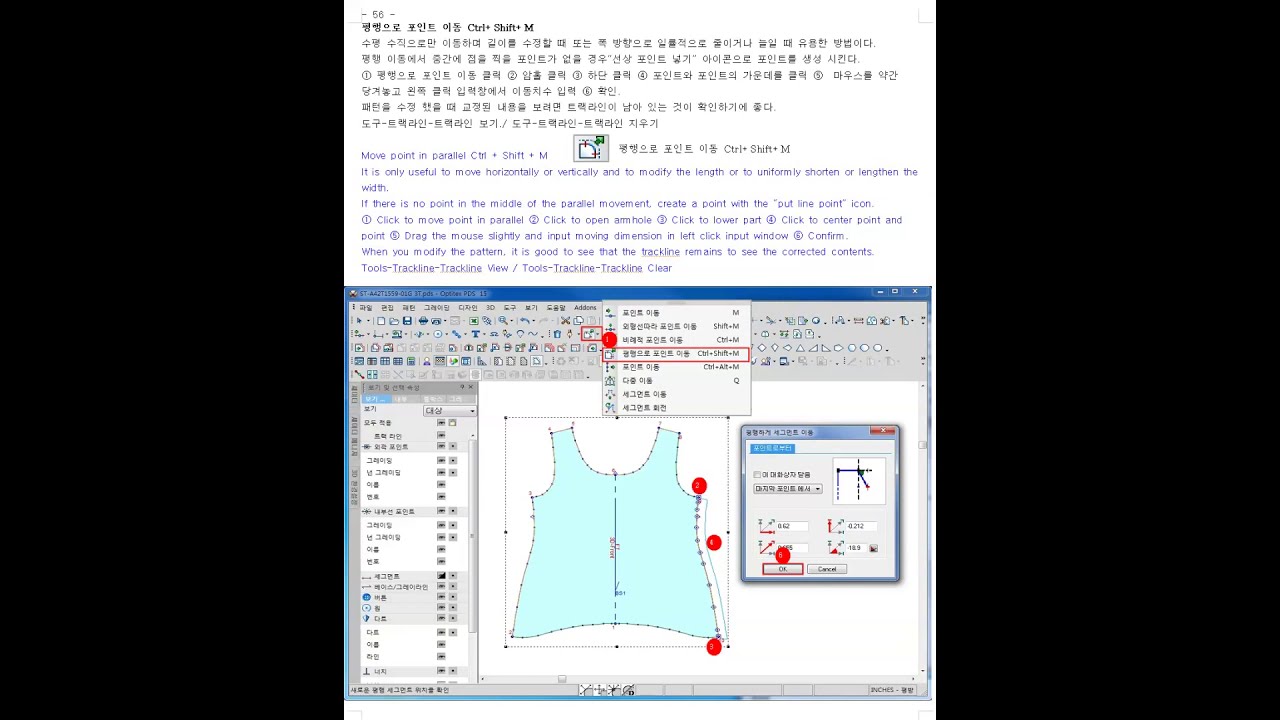
Move point in parallel Ctrl + Shift + M
It is only useful to move horizontally or vertically and to modify the length or to uniformly shorten or lengthen the width.
If there is no point in the middle of the parallel movement, create a point with the “put line point” icon.
① Click to move point in parallel ② Click to open armhole ③ Click to lower part ④ Click to center point and point ⑤ Drag the mouse slightly and input moving dimension in left click input window ⑥ Confirm.
When you modify the pattern, it is good to see that the trackline remains to see the corrected contents.
Tools-Trackline-Trackline View / Tools-Trackline-Trackline Clear

Move proportional point (Ctrl + M)
-Useful when modifying armholes. -0.5 point down from the shoulder to set the point.
-Set the point to about 0.5 inward from the armhole.
① Proportional point movement (Ctrl + M) ② Shoulder Click the set point. ③ Click the point where armhole is set.
④ Release the mouse and move the mouse to select the position. ⑤ Click the left side of the mouse. ⑤ ok.
Note-inserting points.
Click to insert a point-click the required location-OK-right click-select tool-left click.
Tools-Trackline-Trackline View / Tools-Trackline-Trackline Clear

Extend in parallel (Shift + P)
Length & width direction uniformly reducing stretching.
This is a very useful function to move length and width according to the ratio of a certain line.
When trying to extend the Y width direction.
① Shift + P ② Armhole click ③ Place your index finger on the mouse and move the mouse.
④ Enter the extension value in the input window.
When trying to stretch in the X length direction.
① Shift + P ② Bottom right click. ③ Place your index finger on the mouse and move the mouse to the left.
④ Enter the extension value in the input window.

Комментарии

Информация по комментариям в разработке

Похожие видео

  • О нас
  • Контакты
  • Отказ от ответственности - Disclaimer
  • Условия использования сайта - TOS
  • Политика конфиденциальности

video2dn Copyright © 2023 - 2025

Контакты для правообладателей [email protected]