Logo video2dn
  • Сохранить видео с ютуба
  • Категории
    • Музыка
    • Кино и Анимация
    • Автомобили
    • Животные
    • Спорт
    • Путешествия
    • Игры
    • Люди и Блоги
    • Юмор
    • Развлечения
    • Новости и Политика
    • Howto и Стиль
    • Diy своими руками
    • Образование
    • Наука и Технологии
    • Некоммерческие Организации
  • О сайте

Скачать или смотреть Condor Tools Wiki Search Example 1

  • Ken Riopelle
  • 2012-07-21
  • 263
Condor Tools Wiki Search Example 1
Codorsoftwaretraining
  • ok logo

Скачать Condor Tools Wiki Search Example 1 бесплатно в качестве 4к (2к / 1080p)

У нас вы можете скачать бесплатно Condor Tools Wiki Search Example 1 или посмотреть видео с ютуба в максимальном доступном качестве.

Для скачивания выберите вариант из формы ниже:

  • Информация по загрузке:

Cкачать музыку Condor Tools Wiki Search Example 1 бесплатно в формате MP3:

Если иконки загрузки не отобразились, ПОЖАЛУЙСТА, НАЖМИТЕ ЗДЕСЬ или обновите страницу
Если у вас возникли трудности с загрузкой, пожалуйста, свяжитесь с нами по контактам, указанным в нижней части страницы.
Спасибо за использование сервиса video2dn.com

Описание к видео Condor Tools Wiki Search Example 1

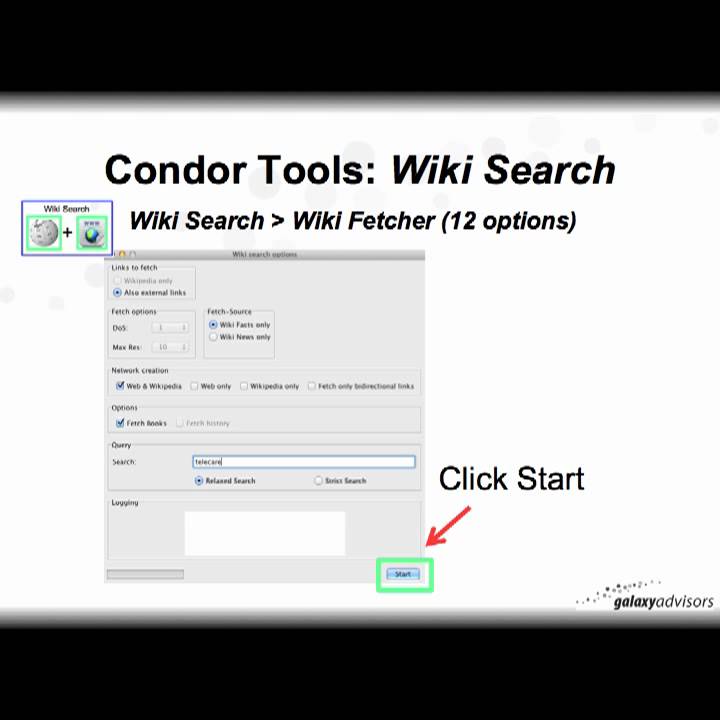
Explains how to use the Condor Tool Wiki Search using an example with the term "telecare".

Wiki-Search uses a two-stage process to construct a network of Wiki articles/nodes (internal to Wikipedia) and/or Web URLs/nodes (external to Wikipedia) for a search term(s) using a set of 10 rating algorithms to characterize the resulting search articles/Urls/nodes in a static network map. A link may between two Wiki articles or a link may between a Wiki article and a Web URL. There are no Web-URL to Web-URL links. If a Web node is included, it must contain at least one link to a Wiki article/node.

The first stage of Wiki-Search uses the sub-form "Wiki-Fetcher" to collect Wiki and/or Web nodes and links based upon selected search options. The Wiki-Fetcher search results are stored in a MySQL database called "wikisearch," which is automatically created during your first search. This is an intermediate database, which is not used for visualization.

The second stage of Wiki-Search uses the sub-form "Wiki-Rating" where users select a method from a set of 10 algorithms to calculate a rating of the nodes from the previous Wiki-Fetcher search and to set a threshold value for excluding low rated nodes. Ratings are calculated one at a time. The second stage Wiki-Rating results are saved into a new database of the user's choice, which is used by Condor to visualize the results.

A unique feature of Wiki-Search is the identification of a book's 10 or 13 digit International Standard Book Number, or ISBN, linked to a Wikipedia article(s). The 10 or 13 digit ISBN can be used to retrieve the title, cover, and pricing information via third party websites for a single volume or in bulk for up to 75 ISBNs at one time.

Duration: 22mins0secs

Condor video page at:
http://www.galaxyadvisors.com/science...

Комментарии

Информация по комментариям в разработке

Похожие видео

  • О нас
  • Контакты
  • Отказ от ответственности - Disclaimer
  • Условия использования сайта - TOS
  • Политика конфиденциальности

video2dn Copyright © 2023 - 2025

Контакты для правообладателей [email protected]