Logo video2dn
  • Сохранить видео с ютуба
  • Категории
    • Музыка
    • Кино и Анимация
    • Автомобили
    • Животные
    • Спорт
    • Путешествия
    • Игры
    • Люди и Блоги
    • Юмор
    • Развлечения
    • Новости и Политика
    • Howto и Стиль
    • Diy своими руками
    • Образование
    • Наука и Технологии
    • Некоммерческие Организации
  • О сайте

Скачать или смотреть Installing Video Converters (HandBrake/FFmpeg) and Automating Updates for FFmpeg & yt-dlp on Fedora

  • Fedora Os {Prime fedora Os user}
  • 2025-11-03
  • 46
Installing Video Converters (HandBrake/FFmpeg) and Automating Updates for FFmpeg & yt-dlp on Fedora
  • ok logo

Скачать Installing Video Converters (HandBrake/FFmpeg) and Automating Updates for FFmpeg & yt-dlp on Fedora бесплатно в качестве 4к (2к / 1080p)

У нас вы можете скачать бесплатно Installing Video Converters (HandBrake/FFmpeg) and Automating Updates for FFmpeg & yt-dlp on Fedora или посмотреть видео с ютуба в максимальном доступном качестве.

Для скачивания выберите вариант из формы ниже:

  • Информация по загрузке:

Cкачать музыку Installing Video Converters (HandBrake/FFmpeg) and Automating Updates for FFmpeg & yt-dlp on Fedora бесплатно в формате MP3:

Если иконки загрузки не отобразились, ПОЖАЛУЙСТА, НАЖМИТЕ ЗДЕСЬ или обновите страницу
Если у вас возникли трудности с загрузкой, пожалуйста, свяжитесь с нами по контактам, указанным в нижней части страницы.
Спасибо за использование сервиса video2dn.com

Описание к видео Installing Video Converters (HandBrake/FFmpeg) and Automating Updates for FFmpeg & yt-dlp on Fedora

You can automate updates for both, but they use different methods.

ffmpeg is a system package (from RPM Fusion) and should be updated by Fedora's package manager (dnf).

yt-dlp is a self-contained program that is best updated by itself.

Here are the commands for both automatic and manual updates
1. Automatic Updates

This is the "set it and forget it" method.

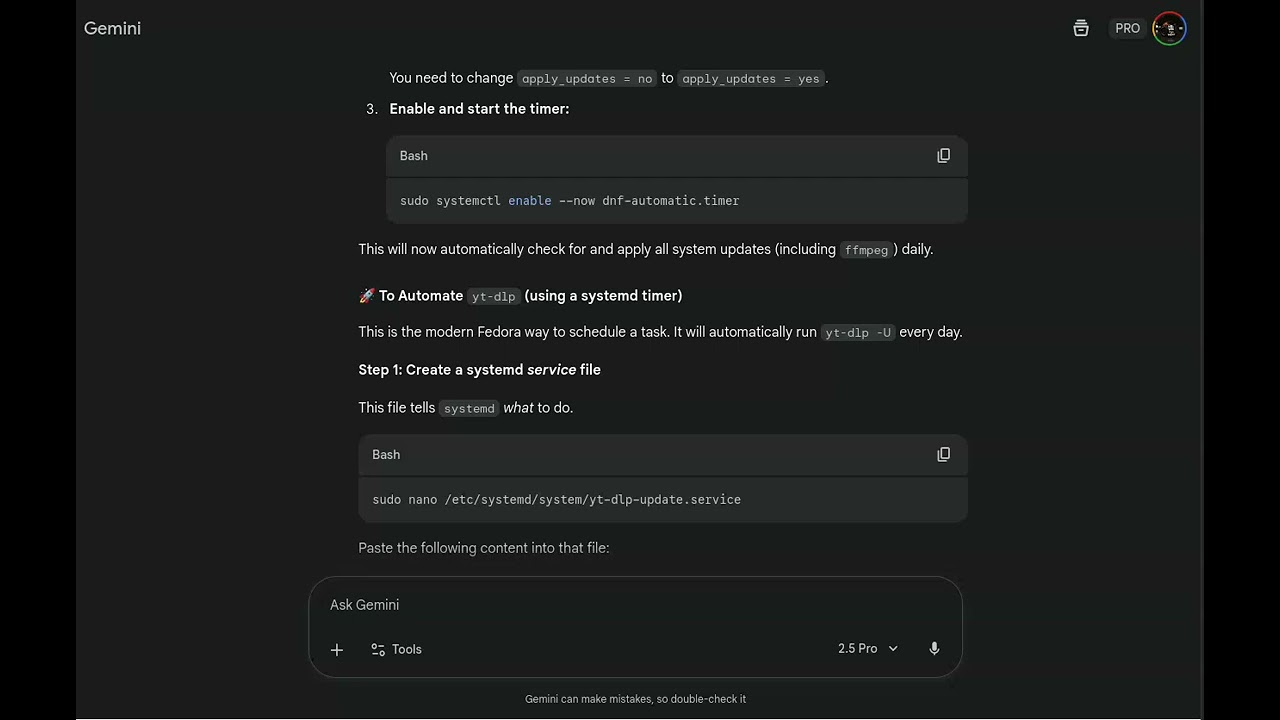
🤖 To Automate ffmpeg (and all system updates)

The best way to do this on Fedora is with dnf-automatic. This tool will automatically download and install system updates for you.

sudo dnf install dnf-automatic
sudo nano /etc/dnf/automatic.conf
sudo systemctl enable --now dnf-automatic.timer


To Automate yt-dlp (using a systemd timer)

This is the modern Fedora way to schedule a task. It will automatically run yt-dlp -U every day.

Step 1: Create a systemd service file
sudo nano /etc/systemd/system/yt-dlp-update.service

paste:

[Unit]
Description=Update yt-dlp
Wants=network-online.target
After=network-online.target

[Service]
Type=oneshot
ExecStart=/usr/local/bin/yt-dlp -U

then ctrl+x ,then press y then ENTER KEY ,

A step-by-step guide for Fedora users on how to install the best video converters. This includes installing HandBrake via Flatpak for a graphical interface and FFmpeg via RPM Fusion for command-line power.

The conversation also provides detailed instructions for setting up automatic updates for both ffmpeg (using dnf-automatic) and yt-dlp (using a custom systemd timer) to ensure the tools are always up-to-date.

Комментарии

Информация по комментариям в разработке

Похожие видео

  • О нас
  • Контакты
  • Отказ от ответственности - Disclaimer
  • Условия использования сайта - TOS
  • Политика конфиденциальности

video2dn Copyright © 2023 - 2025

Контакты для правообладателей [email protected]