Logo video2dn
  • Сохранить видео с ютуба
  • Категории
    • Музыка
    • Кино и Анимация
    • Автомобили
    • Животные
    • Спорт
    • Путешествия
    • Игры
    • Люди и Блоги
    • Юмор
    • Развлечения
    • Новости и Политика
    • Howto и Стиль
    • Diy своими руками
    • Образование
    • Наука и Технологии
    • Некоммерческие Организации
  • О сайте

Скачать или смотреть Circle Pixel Grid in Max/MSP (jit.gl.pix Tutorial)

  • Wellenfront
  • 2025-03-31
  • 736
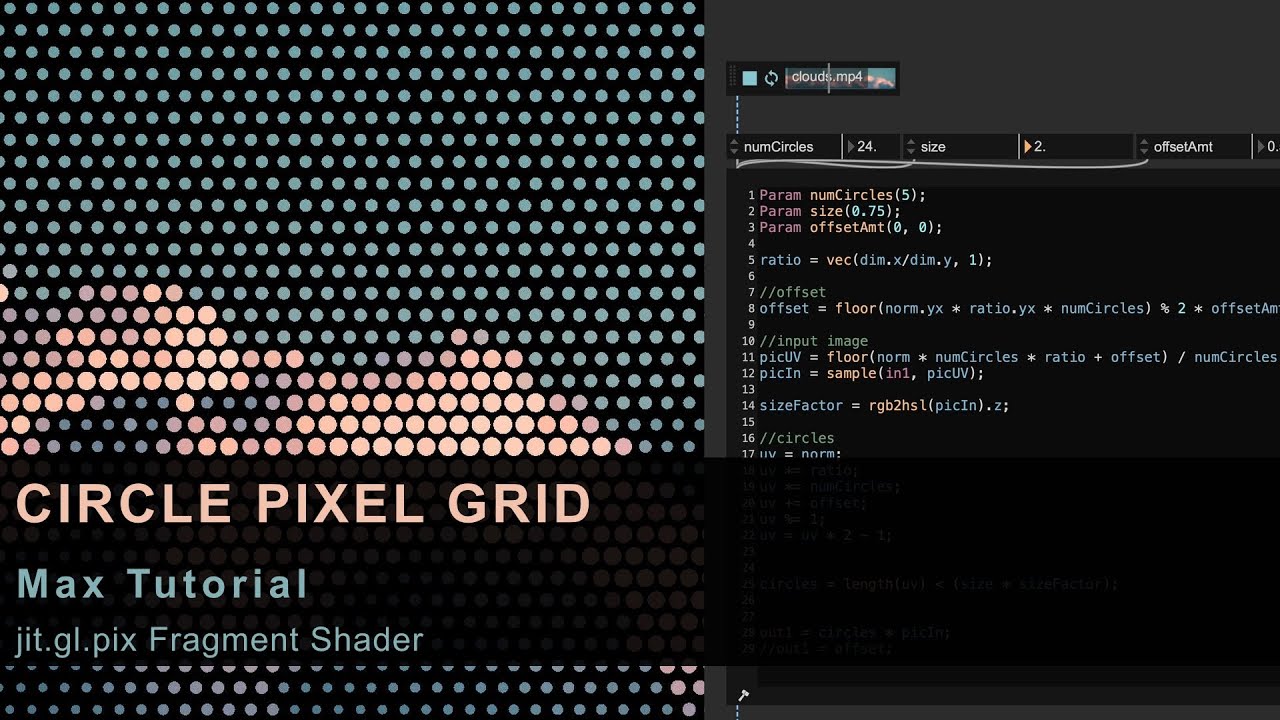
Circle Pixel Grid in Max/MSP (jit.gl.pix Tutorial)
  • ok logo

Скачать Circle Pixel Grid in Max/MSP (jit.gl.pix Tutorial) бесплатно в качестве 4к (2к / 1080p)

У нас вы можете скачать бесплатно Circle Pixel Grid in Max/MSP (jit.gl.pix Tutorial) или посмотреть видео с ютуба в максимальном доступном качестве.

Для скачивания выберите вариант из формы ниже:

  • Информация по загрузке:

Cкачать музыку Circle Pixel Grid in Max/MSP (jit.gl.pix Tutorial) бесплатно в формате MP3:

Если иконки загрузки не отобразились, ПОЖАЛУЙСТА, НАЖМИТЕ ЗДЕСЬ или обновите страницу
Если у вас возникли трудности с загрузкой, пожалуйста, свяжитесь с нами по контактам, указанным в нижней части страницы.
Спасибо за использование сервиса video2dn.com

Описание к видео Circle Pixel Grid in Max/MSP (jit.gl.pix Tutorial)

Circle Pixel Grid in Max/MSP (jit.gl.pix Tutorial)
#maxmsp #creativecoding #jitter #shader

CATEGORY: Jitter Tutorial, jit.gl.pix Fragment Shader
LEVEL: Advanced

In this tutorial, I will demonstrate how to create a circle grid effect in Max/MSP using jit.gl.pix.
A texture is downsampled and each pixel is represented as a circle whose color and size correspond to the original pixel data.

WHAT THIS VIDEO COVERS
Intro 00:00
Drawing a single circle 01:22
Using UV coordinates and the length operator in jit.gl.pix to render a circle.
Drawing multiple circles 07:29
Modifying UV coordinates to create a full grid of circles.
Applying circles to texture 12:34
Mapping the circles to a downsampled input texture.
Adjusting circle size 18:23
Controlling each circle’s size based on the brightness of the input texture.
Adding offset 20:47
Creating a honeycomb-like effect by offsetting every second row or column.
Outro 30:00

ADDITIONAL RESOURCES
Input Video:
https://www.pexels.com/de-de/video/hi...

Drawing shapes with fragment shaders
https://www.shadertoy.com
https://thebookofshaders.com/07/

Max Version used in this Video: 9.0.4

Комментарии

Информация по комментариям в разработке

Похожие видео

  • О нас
  • Контакты
  • Отказ от ответственности - Disclaimer
  • Условия использования сайта - TOS
  • Политика конфиденциальности

video2dn Copyright © 2023 - 2025

Контакты для правообладателей [email protected]