Logo video2dn
  • Сохранить видео с ютуба
  • Категории
    • Музыка
    • Кино и Анимация
    • Автомобили
    • Животные
    • Спорт
    • Путешествия
    • Игры
    • Люди и Блоги
    • Юмор
    • Развлечения
    • Новости и Политика
    • Howto и Стиль
    • Diy своими руками
    • Образование
    • Наука и Технологии
    • Некоммерческие Организации
  • О сайте

Скачать или смотреть ForeFlight Feature Focus: User Map Shapes

  • ForeFlight
  • 2017-04-10
  • 15476
ForeFlight Feature Focus: User Map Shapes
ForeFlightfirelightKMLkeyhole markup languagefile importsideloadingcustom mapsflight schoolspipelinesgeographic shapesiTunesaircraftEFBelectronic flight bagGarmin PilotAppleiPadaviationpilotsflyingHow-TotutorialForeFlight Feature Focus: User Map Shapes
  • ok logo

Скачать ForeFlight Feature Focus: User Map Shapes бесплатно в качестве 4к (2к / 1080p)

У нас вы можете скачать бесплатно ForeFlight Feature Focus: User Map Shapes или посмотреть видео с ютуба в максимальном доступном качестве.

Для скачивания выберите вариант из формы ниже:

  • Информация по загрузке:

Cкачать музыку ForeFlight Feature Focus: User Map Shapes бесплатно в формате MP3:

Если иконки загрузки не отобразились, ПОЖАЛУЙСТА, НАЖМИТЕ ЗДЕСЬ или обновите страницу
Если у вас возникли трудности с загрузкой, пожалуйста, свяжитесь с нами по контактам, указанным в нижней части страницы.
Спасибо за использование сервиса video2dn.com

Описание к видео ForeFlight Feature Focus: User Map Shapes

Visit foreflight.com/map-shapes for additional information about this feature and to download sample KML files.

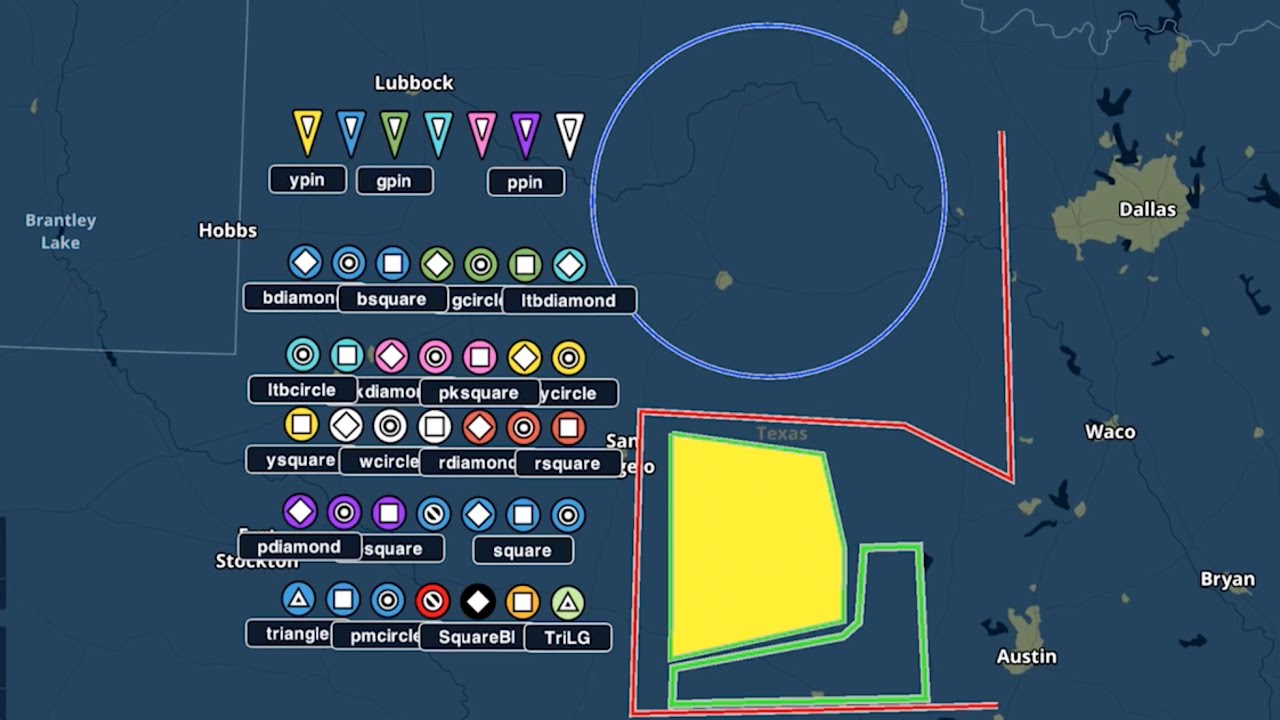
For customers who want to create and use custom map shapes, ForeFlight supports importing KML files to display user-defined shapes, lines, and points on the Maps view.

KML, or keyhole markup language, is a common file type used by programs like Google Earth for storing geographic information. If you use a program that can export your custom map shapes as KMLs, you should be able to import and display those shapes in ForeFlight. Imported KML files cannot be larger than 4MB.

The import process, called “sideloading”, is the same as for importing custom documents and bulk user waypoints. Connect your iPad to your computer and open iTunes. Navigate to your iPad’s app list in iTunes and select ForeFlight, then drag and drop your KML files into the field on the right.

The new files appear at the bottom of the layer selector, on the right. You can display one shape file on the map at a time. If your file includes individual points, you can tap on them to view their coordinates and create a Direct To route from your location to the point.

Beyond simple polygons, lines, and points, ForeFlight also supports labels for points, and various style options like line and fill color, and icon styles. You can find a full list of supported elements, and a sample KML file, at foreflight.com/map-shapes.

Whether defining training areas for a flight school, or conducting pipeline patrol or search and rescue operations, User Map Shapes provide a new level of customization for ForeFlight power users.

Комментарии

Информация по комментариям в разработке

Похожие видео

  • О нас
  • Контакты
  • Отказ от ответственности - Disclaimer
  • Условия использования сайта - TOS
  • Политика конфиденциальности

video2dn Copyright © 2023 - 2025

Контакты для правообладателей [email protected]