Logo video2dn
  • Сохранить видео с ютуба
  • Категории
    • Музыка
    • Кино и Анимация
    • Автомобили
    • Животные
    • Спорт
    • Путешествия
    • Игры
    • Люди и Блоги
    • Юмор
    • Развлечения
    • Новости и Политика
    • Howto и Стиль
    • Diy своими руками
    • Образование
    • Наука и Технологии
    • Некоммерческие Организации
  • О сайте

Скачать или смотреть How to Boot From External USB Drive

  • Frank Sergeant
  • 2024-01-14
  • 1020
How to Boot From External USB Drive
  • ok logo

Скачать How to Boot From External USB Drive бесплатно в качестве 4к (2к / 1080p)

У нас вы можете скачать бесплатно How to Boot From External USB Drive или посмотреть видео с ютуба в максимальном доступном качестве.

Для скачивания выберите вариант из формы ниже:

  • Информация по загрузке:

Cкачать музыку How to Boot From External USB Drive бесплатно в формате MP3:

Если иконки загрузки не отобразились, ПОЖАЛУЙСТА, НАЖМИТЕ ЗДЕСЬ или обновите страницу
Если у вас возникли трудности с загрузкой, пожалуйста, свяжитесь с нами по контактам, указанным в нижней части страницы.
Спасибо за использование сервиса video2dn.com

Описание к видео How to Boot From External USB Drive

Without disturbing the main operating system on the internal drive of your computer, you can boot a different operating system from an external drive via USB.

The external drive must already have an operating system installed on it.

You might use a bare drive by connecting a USB adapter to it, or you could even use a USB stick (thumb drive).

The basic steps are

1. power down the computer

2. connect the USB adapter to the drive and plug the USB cable into the computer and plug in the adapter's power cord (if it has one -- some SSDs (Solid State Drive) USB adapters get their power through the USB connection itself).

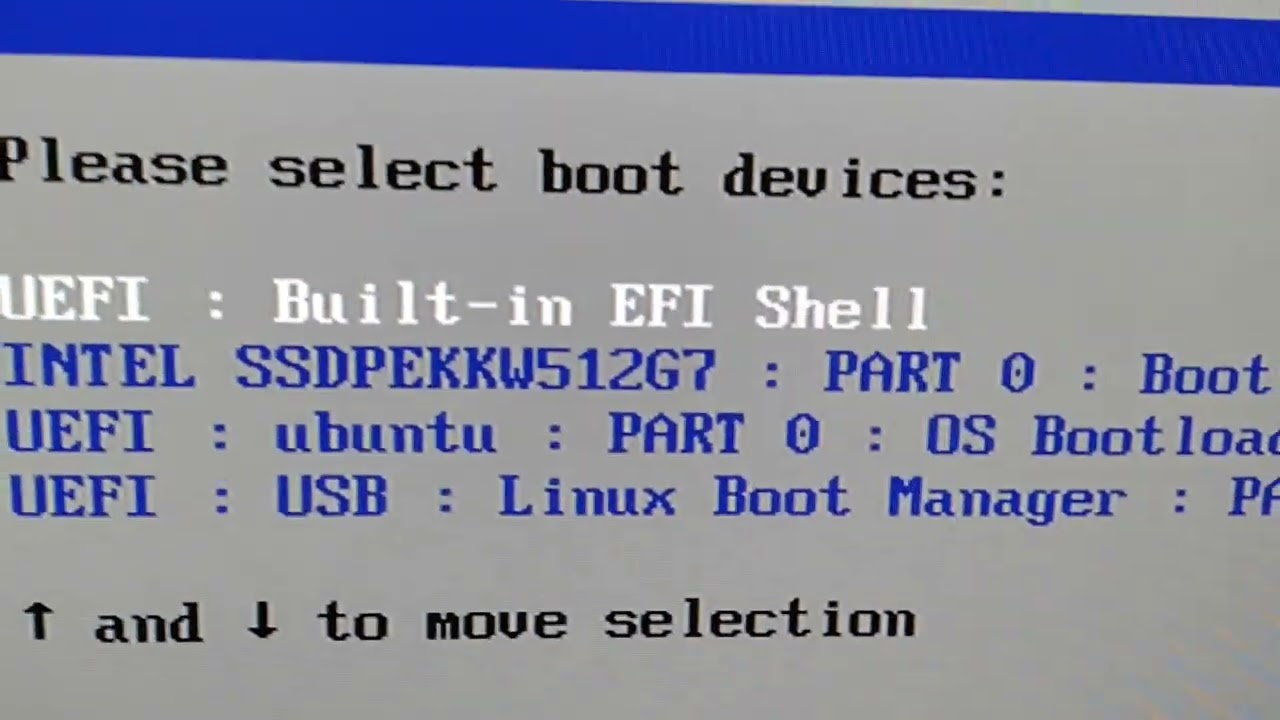
3. power up the computer and press the magic key that brings up the computer's Boot Menu. If you are too slow, the computer may boot to its internal drive. If so, power it down and try again. The magic key is F10 on the Intel NUC computers and F12 on at least some Dell computers. You may need to search in your web browser for something like, "How to I get to the boot menu on XYZ computer model ABC".

4. Select the USB drive from the boot menu and press Return. If you have several choices and don't know which is correct, try each one until you get it right.

Note, many Linux distributions have "Live" USB images and instructions for downloading a live image to your computer and then "burning" it to a USB stick. The you can use the above procedure to boot to the Linux on the USB stick.

Комментарии

Информация по комментариям в разработке

Похожие видео

  • О нас
  • Контакты
  • Отказ от ответственности - Disclaimer
  • Условия использования сайта - TOS
  • Политика конфиденциальности

video2dn Copyright © 2023 - 2025

Контакты для правообладателей [email protected]