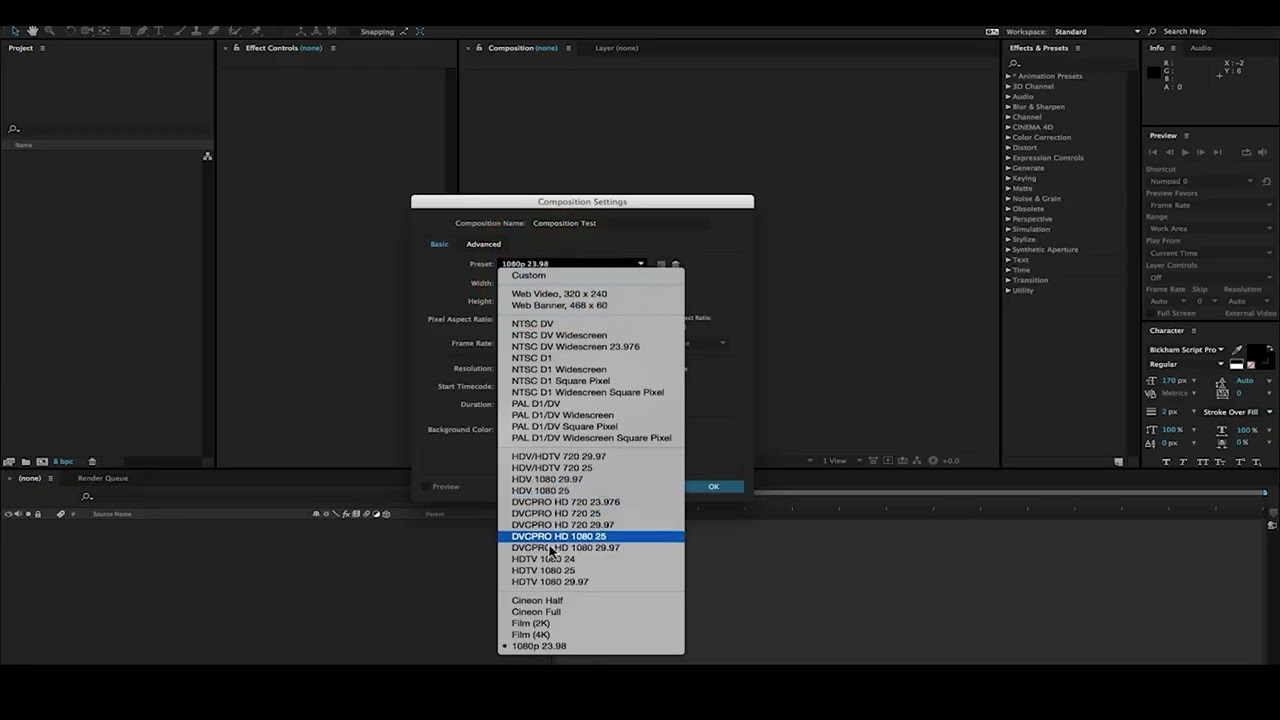
Learn how to create a new composition in Adobe After Effects the correct way. Composition settings are the foundation of every motion graphics, animation, and video editing project. If your comp settings are wrong, your entire output quality can suffer.
Video 01-2
In this beginner friendly After Effects tutorial, you will learn how to create a new comp, set the correct width, height, resolution, frame rate, and duration for YouTube videos, Instagram Reels, YouTube Shorts, and professional motion graphics projects.
A composition in After Effects works like a canvas where you design animations, motion graphics, visual effects, and edits. Every motion designer and video editor must understand how to set up a composition properly before starting any project.
What you will learn:
• What is a composition in After Effects
• How to create a new composition in After Effects
• How to set width and height correctly
• How to choose the correct frame rate (24, 30, 60 fps)
• How to set duration for videos and animations
• Best composition settings for YouTube videos (1920×1080)
• Best composition settings for Reels and Shorts (1080×1920)
• Understanding resolution and aspect ratio in After Effects
• AE fundamentals every beginner must know
This tutorial is perfect for beginners starting motion graphics, animation, or video editing. Mastering comp settings will make your workflow faster and your videos more professional.
Software used: Adobe After Effects
Topics covered: after effects composition, create comp ae, after effects basics, after effects for beginners, comp settings after effects, frame rate ae, resolution ae, motion graphics basics, ae fundamentals, after effects tutorial for beginners, adobe after effects basics, how to use after effects, after effects workflow, motion design basics, visual effects basics.
If you want to become a motion graphics artist or video editor, this is the first and most important step inside After Effects.
after effects composition, create new composition after effects, create comp ae, after effects basics, after effects for beginners, after effects tutorial, adobe after effects tutorial, comp settings after effects, frame rate ae, resolution ae, ae fundamentals, motion graphics basics, motion design tutorial, after effects workflow, how to use after effects, after effects beginner tutorial, after effects basics for beginners, visual effects tutorial, adobe ae basics, composition settings after effects, after effects, after effects tutorial, after effects basics, ae tutorial, motion graphics, motion design, adobe after effects, after effects for beginners, ae basics, visual effects, after effects composition, create new composition in after effects, how to create comp in after effects, create comp ae, comp settings after effects, after effects composition settings, after effects project setup, how to start after effects, first step in after effects, what is composition in after effects, after effects basics for beginners, after effects tutorial for beginners, adobe after effects tutorial, after effects workflow, resolution ae, frame rate ae, after effects width and height settings, after effects aspect ratio, after effects canvas size, best frame rate in after effects, how to set resolution in after effects, after effects settings for youtube video, after effects settings for instagram reels, after effects settings for shorts, after effects vertical video settings, 1080x1920 after effects settings, 1920x1080 after effects settings, after effects comp for reels, after effects comp for youtube, ae composition tutorial, learn after effects, after effects beginner mistake, after effects fundamentals, adobe ae basics
create new composition after effects
after effects basics for beginners
comp settings after effects
frame rate and resolution ae
motion graphics basics
adobe after effects tutorial
#AfterEffects #AETutorial #AEBasics #AfterEffectsForBeginners #MotionGraphics #MotionDesign #VisualEffects #AdobeAE #Composition #LearnAfterEffects
📌 Pinned Comment (SEO + engagement)
Do you want a full After Effects Beginner Series? Comment AE and I’ll upload the next part.

Информация по комментариям в разработке