Logo video2dn
  • Сохранить видео с ютуба
  • Категории
    • Музыка
    • Кино и Анимация
    • Автомобили
    • Животные
    • Спорт
    • Путешествия
    • Игры
    • Люди и Блоги
    • Юмор
    • Развлечения
    • Новости и Политика
    • Howto и Стиль
    • Diy своими руками
    • Образование
    • Наука и Технологии
    • Некоммерческие Организации
  • О сайте

Скачать или смотреть Converting hi-res Flipnic (PS2) FMVs to MP4 *Outdated method*

  • Press any key to continue...
  • 2023-09-17
  • 179
Converting hi-res Flipnic (PS2) FMVs to MP4 *Outdated method*
FlipnicFMVconversionmp4IPUIPSINTPSSPlayStation 2romhackingextraction
  • ok logo

Скачать Converting hi-res Flipnic (PS2) FMVs to MP4 *Outdated method* бесплатно в качестве 4к (2к / 1080p)

У нас вы можете скачать бесплатно Converting hi-res Flipnic (PS2) FMVs to MP4 *Outdated method* или посмотреть видео с ютуба в максимальном доступном качестве.

Для скачивания выберите вариант из формы ниже:

  • Информация по загрузке:

Cкачать музыку Converting hi-res Flipnic (PS2) FMVs to MP4 *Outdated method* бесплатно в формате MP3:

Если иконки загрузки не отобразились, ПОЖАЛУЙСТА, НАЖМИТЕ ЗДЕСЬ или обновите страницу
Если у вас возникли трудности с загрузкой, пожалуйста, свяжитесь с нами по контактам, указанным в нижней части страницы.
Спасибо за использование сервиса video2dn.com

Описание к видео Converting hi-res Flipnic (PS2) FMVs to MP4 *Outdated method*

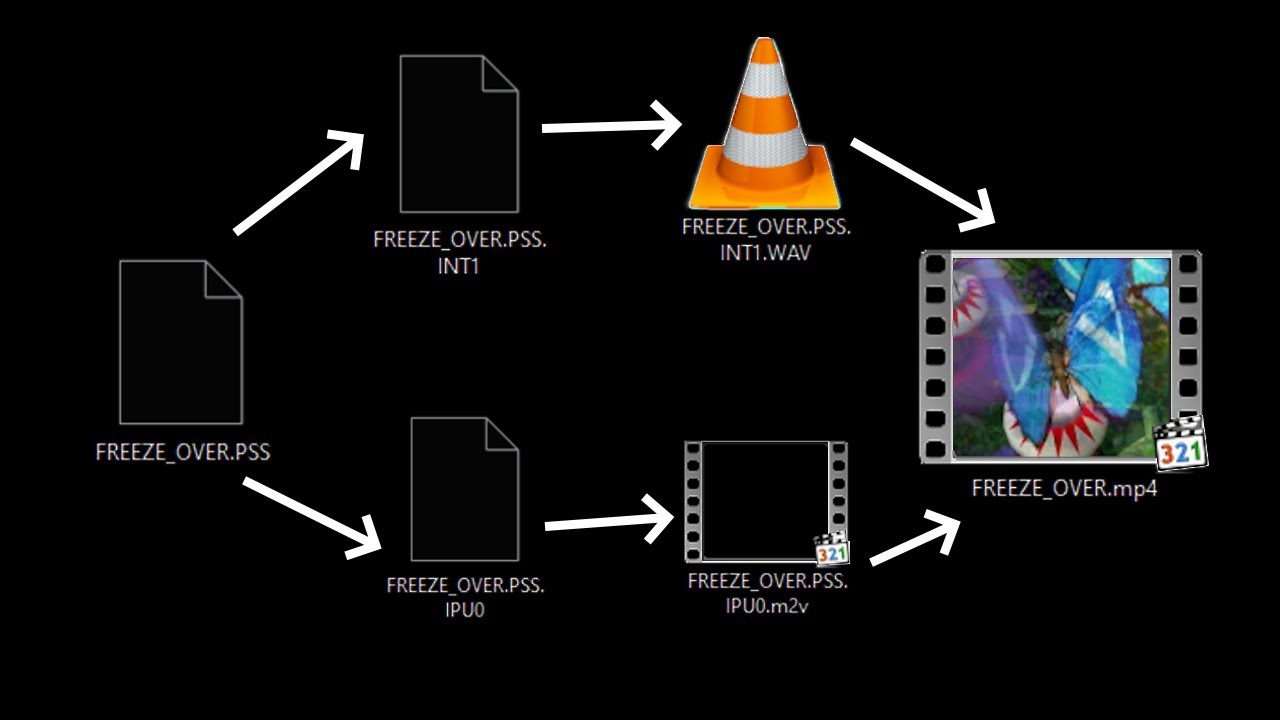
This is a proof-of-concept type of video, where I showcase a multistep process, which allows you to convert the in-game video clips to the regular MP4 file format.

This involves the following steps:

1. Retrieving the STR.BIN file from the game disc
2. Extracting all of the .PSS files using my extraction tool (e.g. FlipnicBinExtractor /e STR.BIN STR, which will try and extract everything to the STR folder)
3. Once again using my tool, separate the audio and video streams from the desired PSS file (e.g. FlipnicBinExtractor /est SILVER_DROP.PSS), which will create INT and IPU files
4. Using MFAudio, convert the INT[n] file(s) to the WAV format (set interleave to 0x400)
5. Using IPUDecoder, convert the IPU file to M2V format (e.g. IPUDecoder SILVER_DROP.PSS.IPU0 SILVER_DROP.M2V)
6. Combine the audio and video using ffmpeg (e.g. ffmpeg -i SILVER_DROP.M2V -i SILVER_DROP.WAV -c:v copy -c:a aac output.mp4)

Currently, this only works with hi-res FMVs, which do not contain transparency data. You are able to do steps 1-4 with transparent FMVs, but the IPUDecoder program isn't capable of extracting this type of video.

You may also notice the final render is a bit blocky. That's an issue with the IPUDecoder program, so there is no easy way to fix that.

Software used:
MFAudio: https://www.zophar.net/utilities/ps2u...
IPUDecoder: https://github.com/samehb/IPUDecoder
FFmpeg: https://ffmpeg.org
FlipnicBinExtractor (my tool): https://github.com/MarkusMaal/Flipnic...

Chapters:
0:00 Listing audio/video streams
0:48 Extracting audio/video streams
1:12 Converting audio
1:55 Converted audio
2:12 Converting video
3:27 Combining converted audio/video
3:55 Converted video

Комментарии

Информация по комментариям в разработке

Похожие видео

  • О нас
  • Контакты
  • Отказ от ответственности - Disclaimer
  • Условия использования сайта - TOS
  • Политика конфиденциальности

video2dn Copyright © 2023 - 2025

Контакты для правообладателей [email protected]