Check out an updated video here: • Sku Grid - Adding Single Item - Shopify ex...
Get Sku Grid: http://skugrid.com/web/?ref=FreeGift
Sku Grid for eBay Sellers - How to Add a Single Item into Sku Grid (eBay)
In this video, we're going to show you how an eBay seller should add a single item into Sku Grid.
If you are not using Hydra Lister to automatically list your items and export the listed items into Sku Grid, then it is highly recommended that you add items to Sku Grid as you are listing them and while you still have your supplier and ebay item information in front of you.
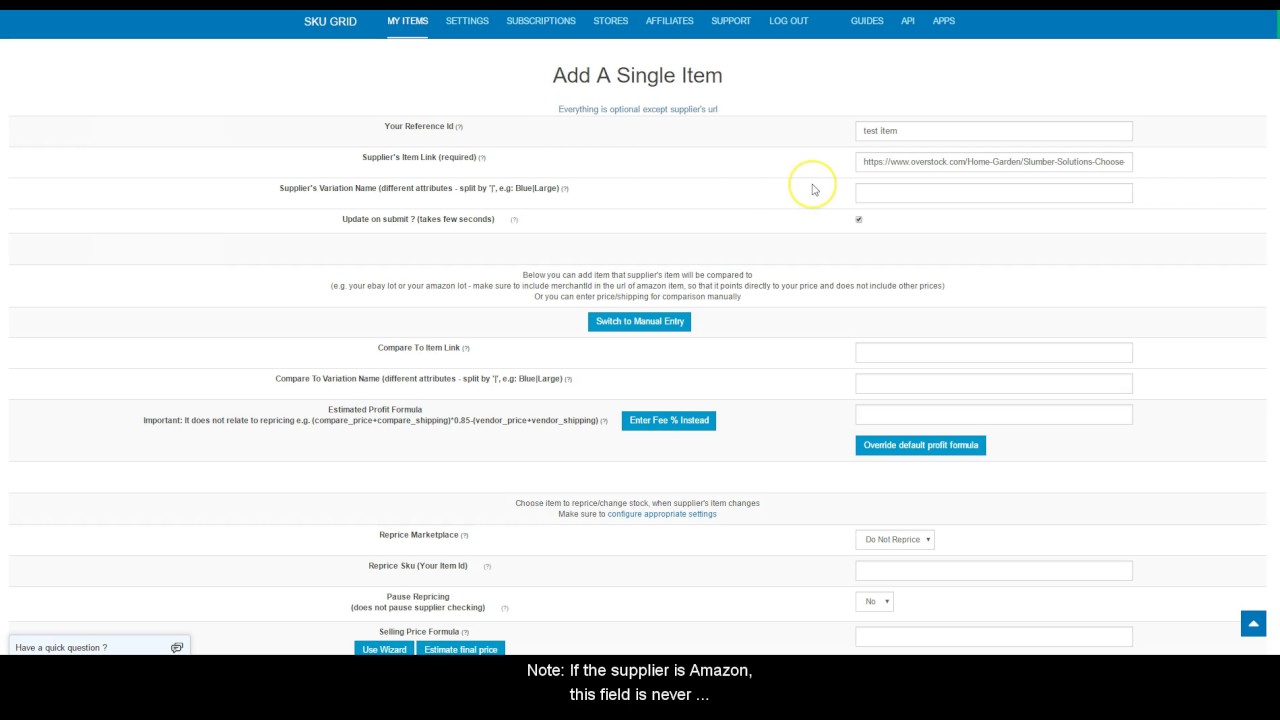
When you're logged into Sku Grid, simply click on the Add Single Item button on the My Items tab.
Enter in Your Reference ID. This can be anything that you want that makes it easy to identify your item. Some people prefer to just put the ebay item number or the listing date here. While other people choose to copy their eBay Listing Title in this box. What you enter here is optional and up to you.
Next, copy your supplier URL iand paste it nto the Supplier Item Link field.
If the supplier is Amazon, then be sure to set the Amazon Pricing option that you want in the Select Option drop down menu that appears. (these options were discussed in detail in another video). Most people prefer Lowest Fulfilled or Lowest Prime Sellers. Be sure to never leave your Amazon items set at default.
Note: Walmart also has options that need to be selected. This will be discussed in a later video.
Next, enter the Supplier's variation name (if any). Note: If the supplier is Amazon, this field is never needed (this will be discussed in detail in another video)
Update on Submit is checked by default -- This means that once you save/update this item, Sku Grid will perform a check and reprice (change price/stock) of the item if necessary.
Next is the Compare Item Section. It is not recommended for eBay sellers to use this section as it will result in extra views on your items. This is also discussed in detail in another video about using compare item urls for eBay sellers. But if you are insisting on using them, you would enter your eBay item URL here.
Next, you would scroll down to the Repricing section of the Add Item Form.
The Reprice Marketplace is the marketplace that you are selling on. Select eBay and the country from the dropdown menu.
The Reprice Sku for eBay sellers will always be your eBay Item Id.
Set Pause Repricing to No.
Override the Default Selling Formula if you desire, but if not, just click Add Item. Note: If you are listing your items at specific prices and want them to stay at that price until the supplier price changes, then you do need to override the item and create an override formula that yields that selling price. We'll discuss that in a later video as well.
You also can choose not to override an item and just click Add Item
Sku Grid will return you to the grid and you'll see your item has been added to the table.
Thank you for watching. We'll see you in the next video.
• Sku Grid for eBay Sellers - How to Add a S...
Incoming Search Terms: Sku Grid, Skugrid, Sku Grid eBay, Skugrid eBay, Sku Grid eBay Sellers, Skugrid eBay Sellers, Sku Grid How to Add Item, Skugrid How to Add Item, Sku Grid Manually Add Item, Skugrid Manually Add Item, Sku Grid Repricing, Skugrid Repricing, Sku Grid Repricer, Skugrid Repricer, Sku Grid Training, Skugrid Training, Sku Grid Tutorial, Skugrid Tutorial, Sku Grid Demo, Skugrid Demo, Sku Grid Support, Skugrid Support

Информация по комментариям в разработке