Logo video2dn
  • Сохранить видео с ютуба
  • Категории
    • Музыка
    • Кино и Анимация
    • Автомобили
    • Животные
    • Спорт
    • Путешествия
    • Игры
    • Люди и Блоги
    • Юмор
    • Развлечения
    • Новости и Политика
    • Howto и Стиль
    • Diy своими руками
    • Образование
    • Наука и Технологии
    • Некоммерческие Организации
  • О сайте

Скачать или смотреть How to use and set up LED Linear Light Fitting?|User Guide for LED Linear Light Fitting -M

  • COMLED Felix
  • 2025-10-14
  • 13
How to use and set up LED Linear Light Fitting?|User Guide for LED Linear Light Fitting -M
  • ok logo

Скачать How to use and set up LED Linear Light Fitting?|User Guide for LED Linear Light Fitting -M бесплатно в качестве 4к (2к / 1080p)

У нас вы можете скачать бесплатно How to use and set up LED Linear Light Fitting?|User Guide for LED Linear Light Fitting -M или посмотреть видео с ютуба в максимальном доступном качестве.

Для скачивания выберите вариант из формы ниже:

  • Информация по загрузке:

Cкачать музыку How to use and set up LED Linear Light Fitting?|User Guide for LED Linear Light Fitting -M бесплатно в формате MP3:

Если иконки загрузки не отобразились, ПОЖАЛУЙСТА, НАЖМИТЕ ЗДЕСЬ или обновите страницу
Если у вас возникли трудности с загрузкой, пожалуйста, свяжитесь с нами по контактам, указанным в нижней части страницы.
Спасибо за использование сервиса video2dn.com

Описание к видео How to use and set up LED Linear Light Fitting?|User Guide for LED Linear Light Fitting -M

Control gear setting:
Pry open the control gear module from luminaire body.
1, Half power DIP switch on control gear allows luminaire working under Half Power Mode.
DIP switch at Half position:half power Mode
DIP switch at Full position:full power Mode
Default : Full position
2, Switch Active DIP on control gear allows Switch Active can be short-circuited with Permanent Active(Live) inside of control gear ( for emergency model Only).
DIP switch at MA position:Switch Active come from outside power supply.
DIP switch at ON position:Switch Active short-circuit with Permanent Active(Live) on control gear.
Default : MA position
After setting, insert the control gear module into luminaire body back
Emergency instruction (For Partial Models Only , See Model Description):
1, Green LED indicator
LED On: main supply on
LED Off: main supply off
2, Red LED indicator
LED On: Battery is in charging
LED Off: Battery was full charged or battery disconnected or main supply off
3, Yellow LED indicator( fault indication)
LED continuously on :indicates work normal. LED slow flash: indicates self-test carried out recently within 6days and passed. LED fast flash: indicates latest self-test carried out recently and failed. LED off :main supply off
1)Slow flash(4 seconds ON,1second OFF) indicates self-test carried out within 6days and self-test passed
normally.This state will keep 6days after last self-test finished.Then change to continuous on.
2)Fast flash(0.5 second ON,0.5 second OFF) indicates latest self-test failed.This state will keep until next self-test
passed.
4, Simulated emergency testing function:
Press the test button and hold on more than 1.5 seconds,the luminaire will simulate main supply failed and enter emergency work mode.Release test button,the luminaire will back to previous status.
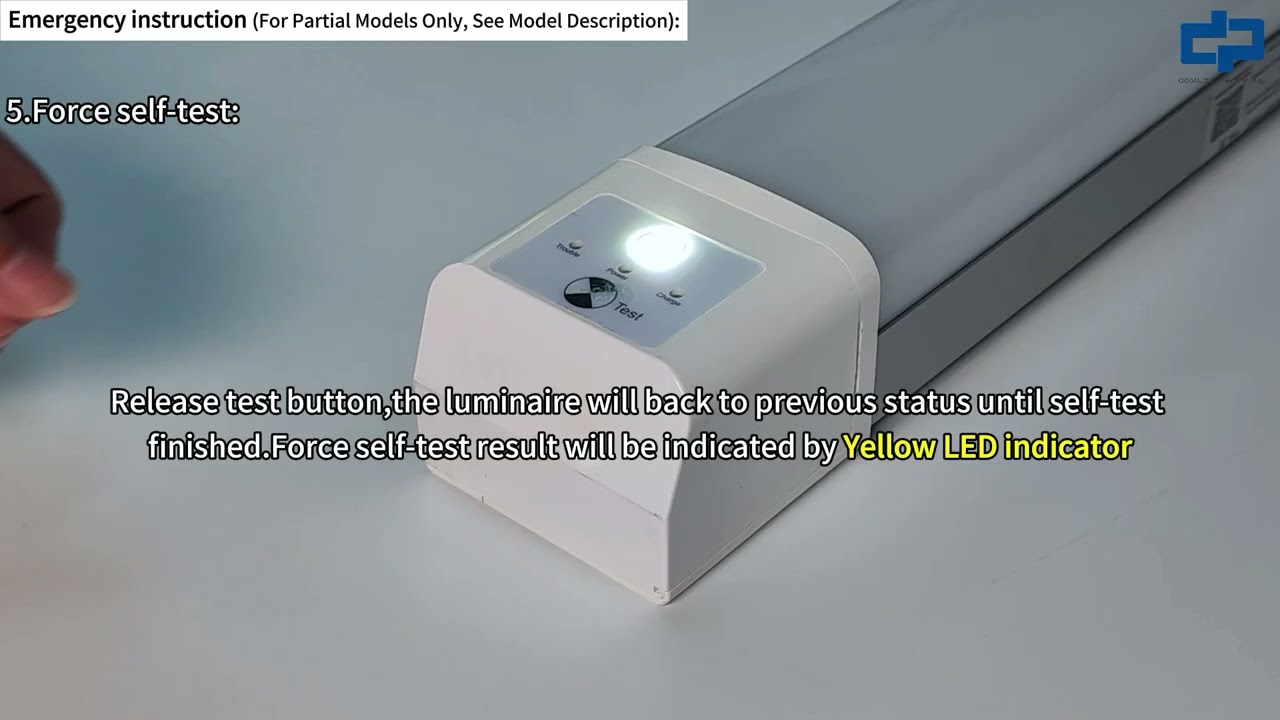
5, Force self-test:
Press the test button and hold on more than 10 seconds,the luminaire will work under self-test mode.Release test button,the luminaire will back to previous status until self-test finished.Force self-test result will be indicated by Yellow LED indicator.
6, Reset to pre-settings:
(operation with caution for non-specialists,default parameters was set by Parameters ①)
Press the test button 3 times within 3 seconds,three indicators will flash 3 time synchronously and the luminaire enter into default setting mode.Green and Red indicators will flash synchronously. Flash Pattern as below,Each flash pattern will keep 3 times,if no test button pressed then back to normal mode. If press test button one short time during any flash pattern,it will change to another next flash pattern.Different flash pattern shows different parameters was set.
Flash once(2 seconds ON,1second OFF):
Parameters ①be reset to: a)disable self-test; b)Time standard 90 minutes;
c)Yellow LED indicator continuously on. Flash twice(2 seconds ON,1 second OFF):
Parameters ② be reset to: a)every 6 months do self-test once; b)Time standard 90 minutes; c)Yellow LED indicator continuously on.
7, Switch off luminaire when under emergency mode:
Within 30minutes after main power failed,press the test button 3 times in 3seconds,the luminaire will switch off.
8, Other test button functions for factory use only. Sensor dimming and Emergency parameters Setting
(For Partial Models Only, See Model Description):
By pressing different buttons on the remote controller as bellow,sensor dimming and emergency parameters can be precisely set by users for each specific application.
Content from:https://www.comledlamp.com/product-ca...
#comled #machine #factoryproducts #factory #ledlight #ledlinearlight

Комментарии

Информация по комментариям в разработке

Похожие видео

  • О нас
  • Контакты
  • Отказ от ответственности - Disclaimer
  • Условия использования сайта - TOS
  • Политика конфиденциальности

video2dn Copyright © 2023 - 2025

Контакты для правообладателей [email protected]