Logo video2dn
  • Сохранить видео с ютуба
  • Категории
    • Музыка
    • Кино и Анимация
    • Автомобили
    • Животные
    • Спорт
    • Путешествия
    • Игры
    • Люди и Блоги
    • Юмор
    • Развлечения
    • Новости и Политика
    • Howto и Стиль
    • Diy своими руками
    • Образование
    • Наука и Технологии
    • Некоммерческие Организации
  • О сайте

Скачать или смотреть How To Make basic NOT gate in MULTISIM |Tools functionality in description |Digital Logic Design-Lab

  • Fatima Jawaid
  • 2021-03-26
  • 149
How To Make basic NOT gate in MULTISIM |Tools functionality in description |Digital Logic Design-Lab
  • ok logo

Скачать How To Make basic NOT gate in MULTISIM |Tools functionality in description |Digital Logic Design-Lab бесплатно в качестве 4к (2к / 1080p)

У нас вы можете скачать бесплатно How To Make basic NOT gate in MULTISIM |Tools functionality in description |Digital Logic Design-Lab или посмотреть видео с ютуба в максимальном доступном качестве.

Для скачивания выберите вариант из формы ниже:

  • Информация по загрузке:

Cкачать музыку How To Make basic NOT gate in MULTISIM |Tools functionality in description |Digital Logic Design-Lab бесплатно в формате MP3:

Если иконки загрузки не отобразились, ПОЖАЛУЙСТА, НАЖМИТЕ ЗДЕСЬ или обновите страницу
Если у вас возникли трудности с загрузкой, пожалуйста, свяжитесь с нами по контактам, указанным в нижней части страницы.
Спасибо за использование сервиса video2dn.com

Описание к видео How To Make basic NOT gate in MULTISIM |Tools functionality in description |Digital Logic Design-Lab

Special thank you to my Instructor Sir Haque Nawaz Lashari lecturer at SMI University

Digital Logic Design- BS-CS, SE course

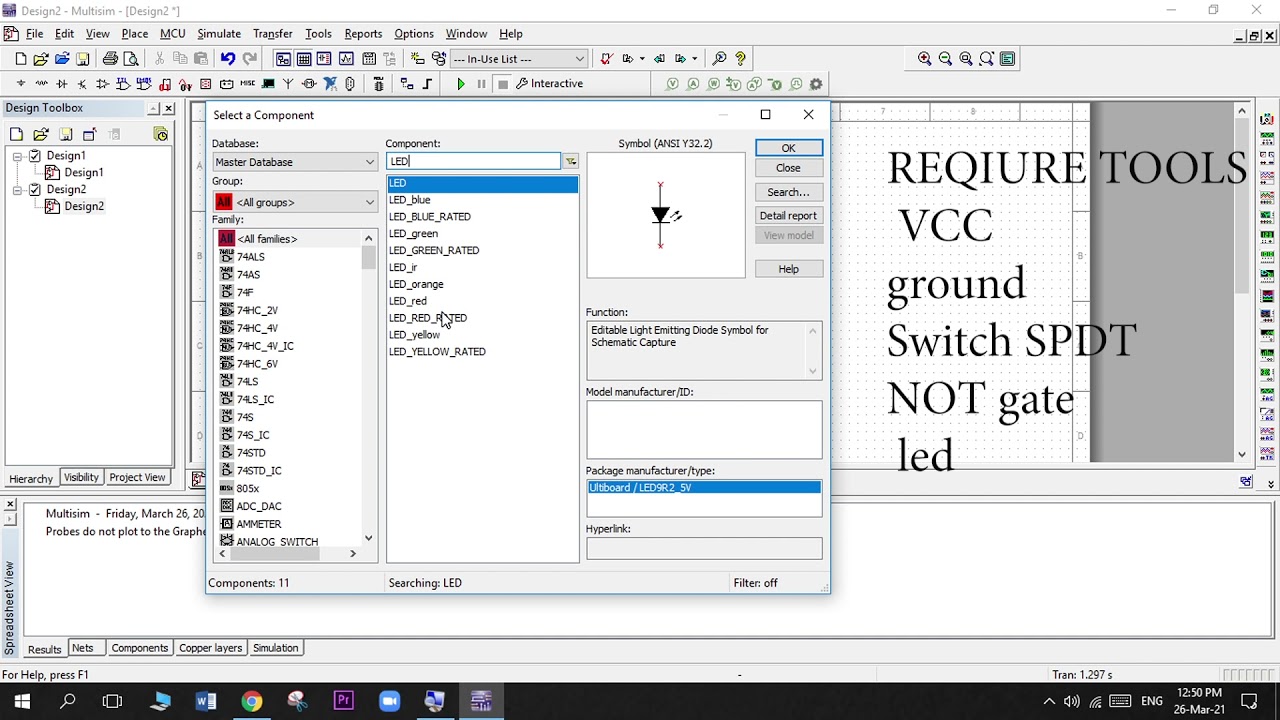
Requirement tools
1- VCC 5 volts - use to supply current (1) to led light via NOT gate

2- Ground (analog ground) - here ground mean OFF (NEGATIVE) no current pass that's why we use to off
there is no current in ground

3- Switch (SDPT) here switch is use like switch botton one point for On which is connected with VCC current and other point for OFF which is connected with ground

4- NOT (U1) Gate, main tool for this design. Basically this is logic Gate if you give input 1(on) the output will be 0 (off) and if you give input 0(off) the output will be 1(on) here led light represent the output which is connected with NOT gate (output side) and ground wire

5- LED light orange - is use to check out NOT gate logic either works or not either we connected wires correctly or not

then after all we run our design with the help crtl+W(may be your short key change) or run button then do on/off with switch

Комментарии

Информация по комментариям в разработке

Похожие видео

  • О нас
  • Контакты
  • Отказ от ответственности - Disclaimer
  • Условия использования сайта - TOS
  • Политика конфиденциальности

video2dn Copyright © 2023 - 2025

Контакты для правообладателей [email protected]