Logo video2dn
  • Сохранить видео с ютуба
  • Категории
    • Музыка
    • Кино и Анимация
    • Автомобили
    • Животные
    • Спорт
    • Путешествия
    • Игры
    • Люди и Блоги
    • Юмор
    • Развлечения
    • Новости и Политика
    • Howto и Стиль
    • Diy своими руками
    • Образование
    • Наука и Технологии
    • Некоммерческие Организации
  • О сайте

Скачать или смотреть Madden 25 Modding Tutorial

  • BPhit4
  • 2024-09-30
  • 39110
Madden 25 Modding Tutorial
  • ok logo

Скачать Madden 25 Modding Tutorial бесплатно в качестве 4к (2к / 1080p)

У нас вы можете скачать бесплатно Madden 25 Modding Tutorial или посмотреть видео с ютуба в максимальном доступном качестве.

Для скачивания выберите вариант из формы ниже:

  • Информация по загрузке:

Cкачать музыку Madden 25 Modding Tutorial бесплатно в формате MP3:

Если иконки загрузки не отобразились, ПОЖАЛУЙСТА, НАЖМИТЕ ЗДЕСЬ или обновите страницу
Если у вас возникли трудности с загрузкой, пожалуйста, свяжитесь с нами по контактам, указанным в нижней части страницы.
Спасибо за использование сервиса video2dn.com

Описание к видео Madden 25 Modding Tutorial

Madden 25 Modding Tutorial

Download Madden 25 Modding tools in the MMC Discord.
https://discordapp.com/channels/48332...

Madden 25 Modding Installation and Download Guide
---------------------------
The Madden Modding Community DOES NOT allow the use of any mods during online play (including franchise mode). Follow these steps carefully to ensure proper setup for Madden 25 modding.

There is a 10-15 Second wait at the start of Madden loading, DO NOT EXIT
Keyboard and mouse functionality has to be disabled in order for modding to work this year. There is no workaround.


Video Tutorial: For a step-by-step guide, check out this video by one of our room admins @bphit4: The Madden 25 Modding Tutorial. It covers everything you need to know to get started.
   • Madden 25 Modding Tutorial  

Extract the Rar File:
Extract the contents of the MMC_Madden25_Modding_Tools.rar file using WinRar, WinZip, or any decompression tool, and place them in a dedicated folder on the same drive as your Madden 25 installation.
Disable Original Anti-Cheat:
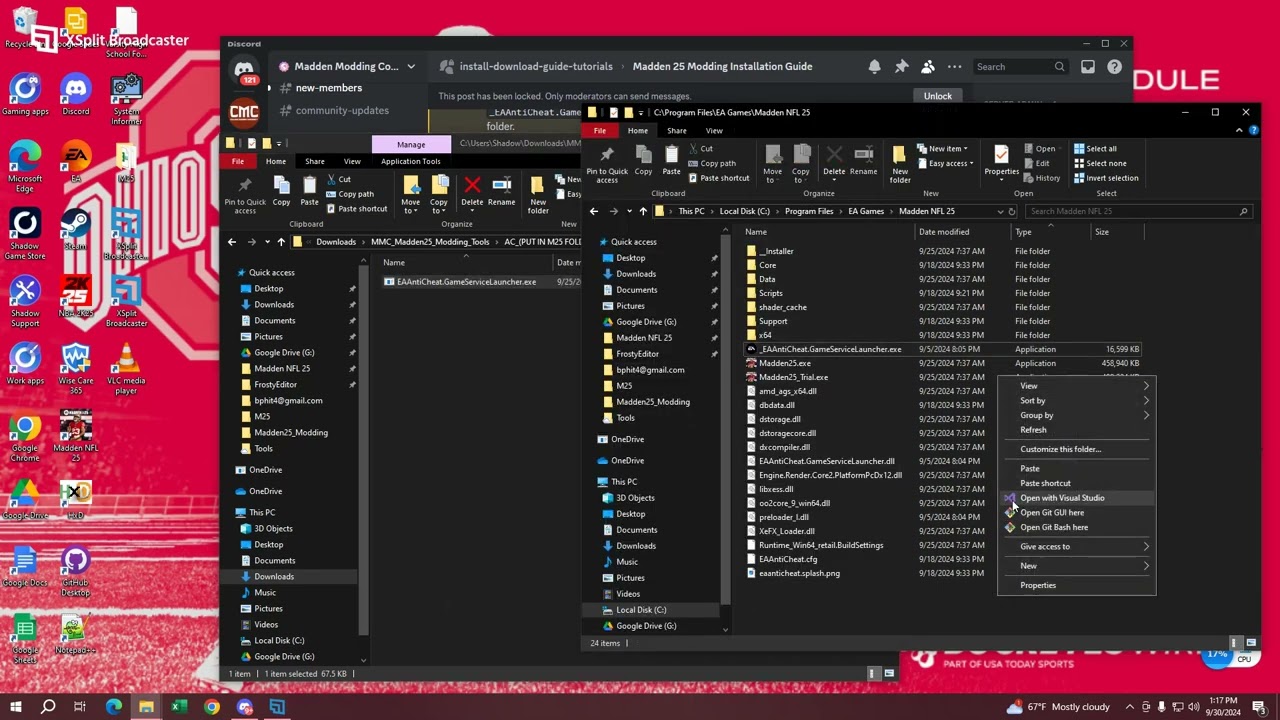
Navigate to your Madden 25 game folder (located at C:\Program Files\EA Games\Madden NFL 25, or you can right click the M25 shortcut exe and select open file location).
Rename EAAntiCheat.GameServiceLauncher.exe to something else, such as _EAAntiCheat.GameServiceLauncher.exe(you can call it whatever you want).
Replace Anti-Cheat Launcher:
Copy the EAAntiCheat.GameServiceLauncher.exe from the extracted MaddenModding folder and paste it into your Madden 25 game folder, replacing the modified version. We have included this in both the Mod Manager and Editor folders. It is the same file, you only need to use one.

MMC Mod Manager is to play with mods

Setup MMC Mod Manager:
Launch the MMC Mod Manager by opening the exe located in your mod folder.
Important: Run MMC Mod Manager as an administrator (right-click the application, select Properties / Compatibility / Run as administrator).
Importing and Activating Mods:
Open MMC Mod Manager and select Add Mod. Navigate to the location where your .fbmod files are saved and import them.
Once imported, click on each mod you want to use, and then click Apply.
Launching the Game:
With your mods applied, click the Launch button within MMC Mod Manager to start Madden 25 with the selected mods active.

MMC Editor is to create your own mods

Setting Up MMC Editor:
Launch the MMC Editor by opening the exe located in your mod folder.
Important: Run MMC Editor as an administrator (right-click the application, select Properties / Compatibility / Run as administrator).
Creating or Editing Mods:
Open MMC Editor, navigate to the necessary files you want to modify, and make your desired changes.
Save your modifications, and ensure they are properly configured before launching the game.

Restoring Original Files (if needed)

EAAntiCheat.GameServiceLauncher.exe: If you need to restore the original anti-cheat launcher to play online, remove the modified version and rename _EAAntiCheat.GameServiceLauncher.exe back to its original name in the Madden 25 game folder.

Troubleshooting and Support

If you encounter issues or need help, visit the Madden Modding Community Troubleshooting channel:

Комментарии

Информация по комментариям в разработке

Похожие видео

  • О нас
  • Контакты
  • Отказ от ответственности - Disclaimer
  • Условия использования сайта - TOS
  • Политика конфиденциальности

video2dn Copyright © 2023 - 2025

Контакты для правообладателей [email protected]