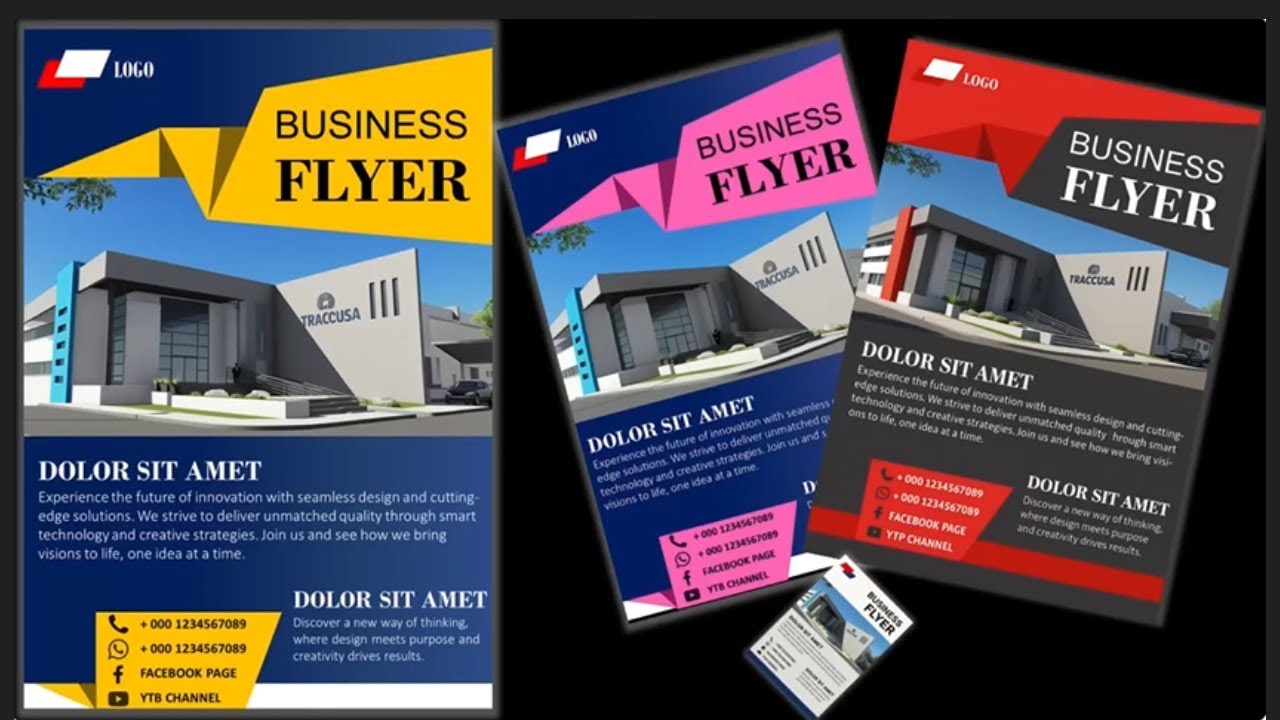
Learn how to create a professional business flyer entirely in PowerPoint! This step-by-step tutorial shows you how to design print-ready A4 flyers for your business without using Canva, Photoshop, or any expensive design software. Perfect for small businesses, entrepreneurs, freelancers, and students!
🎯 WHAT YOU'LL CREATE:
Professional A4 business flyer
Print-ready layout (8.27" x 11.69")
Custom gradient backgrounds
Stylish geometric design elements
Professional logo placement
Contact information sections
Fully editable template
Export-ready for printing
⏱️ DETAILED CHAPTER TIMESTAMPS:
0:00 - Introduction to Business Flyer Design
0:06 - Set A4 Slide Size (Design Tab)
0:12 - Create Print-Friendly Layout
0:17 - Insert Rectangle Shape
0:25 - Remove Shape Outline
0:30 - Apply Gradient Fill Effect
0:37 - Customize Gradient Color Stops
0:43 - Duplicate & Enlarge Background Shape
0:48 - Create Freeform Design Accents
1:14 - Design Custom Stylish Elements
1:18 - Insert Flowchart Shape for Logo
1:23 - Duplicate & Color Logo Elements
1:29 - Group Logo Shapes Together
1:42 - Insert Text Box for Title
1:45 - Change Font, Color & Size
1:49 - Add "Business Flyer" Title
1:57 - Insert Your Business Image
2:08 - Position & Rotate Bottom Elements
2:09 - Flip Elements Vertically
2:31 - Create Freeform Balance Shapes
2:37 - Add Contact Details & Services
2:39 - Insert Business Information
2:46 - Preview in Slideshow Mode
2:53 - Final Professional Flyer Result!
2:58 - Download Editable Template
🎨 DESIGN TECHNIQUES COVERED:
✓ A4 print layout setup (21cm x 29.7cm)
✓ Gradient fill mastery
✓ Shape layering techniques
✓ Freeform shape design
✓ Logo creation in PowerPoint
✓ Text formatting & styling
✓ Image placement & ordering
✓ Shape rotation (90° techniques)
✓ Color coordination
✓ Professional composition
✓ Print-ready export settings
📐 EXACT FLYER SPECIFICATIONS:
Size: A4 (8.27" x 11.69" / 21cm x 29.7cm)
Orientation: Portrait
Resolution: High Quality (300 DPI for print)
Color Mode: RGB (CMYK for professional printing)
Margins: 0.5" recommended
Bleed: Add 0.125" if printing professionally
File Format: PDF (for printing) / PNG (for digital)
💼 PERFECT FOR:
Small business promotions
Real estate flyers
Event announcements
Restaurant menus
Product launches
Service advertisements
Workshop promotions
Sales & discounts
Grand opening announcements
Corporate events
Fitness classes
Beauty salons
Consulting services
Coaching programs
Webinar promotions
🖨️ PRINTING TIPS:
1. Export as PDF for best quality
2. Use "High Quality" export setting
3. Check colors on printed test page
4. Use professional printing service for bulk
5. Cardstock paper (200-300gsm) recommended
6. Add bleed area for edge-to-edge printing
7. Convert RGB to CMYK for offset printing
8. Save master file before flattening
📱 DIGITAL USE OPTIONS:
Instagram posts (resize to 1080x1080)
Facebook business posts
Email marketing campaigns
Website landing pages
LinkedIn promotions
WhatsApp business updates
Twitter announcements
Pinterest marketing
🎁 FREE RESOURCES IN DESCRIPTION:
📥 Editable PowerPoint Flyer Template
📥 10 Professional Color Palettes
📥 Font Pairing Guide (Free Google Fonts)
📥 Business Icons Pack (100+ icons)
📥 Print-Ready Export Settings Guide
📥 A4 Size Setup Tutorial PDF
🎨 Gradient Color Combinations
📐 Design Layout Grid Templates
#PowerPointFlyer #FlyerDesign #BusinessFlyer #PowerPointTutorial #FlyerTutorial #PowerPointDesign #GraphicDesign #BusinessMarketing #PowerPoint #FlyerMaking #SmallBusiness #PowerPointTemplate #DesignTutorial #PPTDesign #HowToMakeFlyer
🔗 RELATED TUTORIALS YOU'LL LOVE:
Business Card Design in PowerPoint
Brochure Design Tutorial
Instagram Post Templates
Logo Design in PowerPoint
Poster Design Tutorial
Certificate Design Guide
Menu Design Tutorial
Invoice Template Creation
🔍 POPULAR SEARCH TERMS:
how to make flyer in powerpoint, powerpoint flyer tutorial, business flyer design, create flyer powerpoint, flyer template powerpoint, powerpoint design tutorial, flyer making tutorial, professional flyer design, a4 flyer powerpoint, print ready flyer, powerpoint graphic design, business promotional material, flyer design tips, marketing flyer powerpoint, event flyer design, powerpoint layout design
🔔 SUBSCRIBE FOR:
✓ Weekly PowerPoint tutorials
✓ Free design templates
✓ Business marketing tips
✓ Graphic design hacks
✓ Productivity shortcuts
🎯 KEYWORDS FOR DISCOVERY:
flyer design powerpoint tutorial, how to create business flyer, powerpoint flyer template, make flyer in ppt, design flyer without canva, professional flyer tutorial, a4 flyer design, print ready flyer powerpoint, business marketing materials, promotional flyer design, powerpoint graphic design, flyer layout tutorial, free flyer template, small business flyer
Thanks for watching! Let's design something amazing! 📄✨

Информация по комментариям в разработке