Logo video2dn
  • Сохранить видео с ютуба
  • Категории
    • Музыка
    • Кино и Анимация
    • Автомобили
    • Животные
    • Спорт
    • Путешествия
    • Игры
    • Люди и Блоги
    • Юмор
    • Развлечения
    • Новости и Политика
    • Howto и Стиль
    • Diy своими руками
    • Образование
    • Наука и Технологии
    • Некоммерческие Организации
  • О сайте

Скачать или смотреть Koolo Resurrected - Full setup & Auto Leveling config (D2R)

  • kwader wan
  • 2025-12-30
  • 914
Koolo Resurrected - Full setup & Auto Leveling config (D2R)
  • ok logo

Скачать Koolo Resurrected - Full setup & Auto Leveling config (D2R) бесплатно в качестве 4к (2к / 1080p)

У нас вы можете скачать бесплатно Koolo Resurrected - Full setup & Auto Leveling config (D2R) или посмотреть видео с ютуба в максимальном доступном качестве.

Для скачивания выберите вариант из формы ниже:

  • Информация по загрузке:

Cкачать музыку Koolo Resurrected - Full setup & Auto Leveling config (D2R) бесплатно в формате MP3:

Если иконки загрузки не отобразились, ПОЖАЛУЙСТА, НАЖМИТЕ ЗДЕСЬ или обновите страницу
Если у вас возникли трудности с загрузкой, пожалуйста, свяжитесь с нами по контактам, указанным в нижней части страницы.
Спасибо за использование сервиса video2dn.com

Описание к видео Koolo Resurrected - Full setup & Auto Leveling config (D2R)

All info on token authentication setup is below the instruction list.
You can find the information also in our discord server discord.gg/5GCdFDbJnx in the #info channel.

------------------------------------------------------------------------------------------------------

0) D2R must be installed and started at least one time manually until you reach the character screen.

1) Install go

go.dev/dl/go1.24.11.windows-amd64.msi

2) Install git

git-scm.com/install/

3) Install garble

go install mvdan.cc/[email protected]

4) Clone Repo

cd %userprofile%\Desktop
git clone https://github.com/kwader2k/koolo

5) Add koolo folder to Antivirus

6) Use better_build

7) Download Diablo 2 Lod 1.13c

drive.google.com/file/d/1c3b6H4q1cAs9gQhGO4E22m-PFG6aPNXN/view?usp=sharing

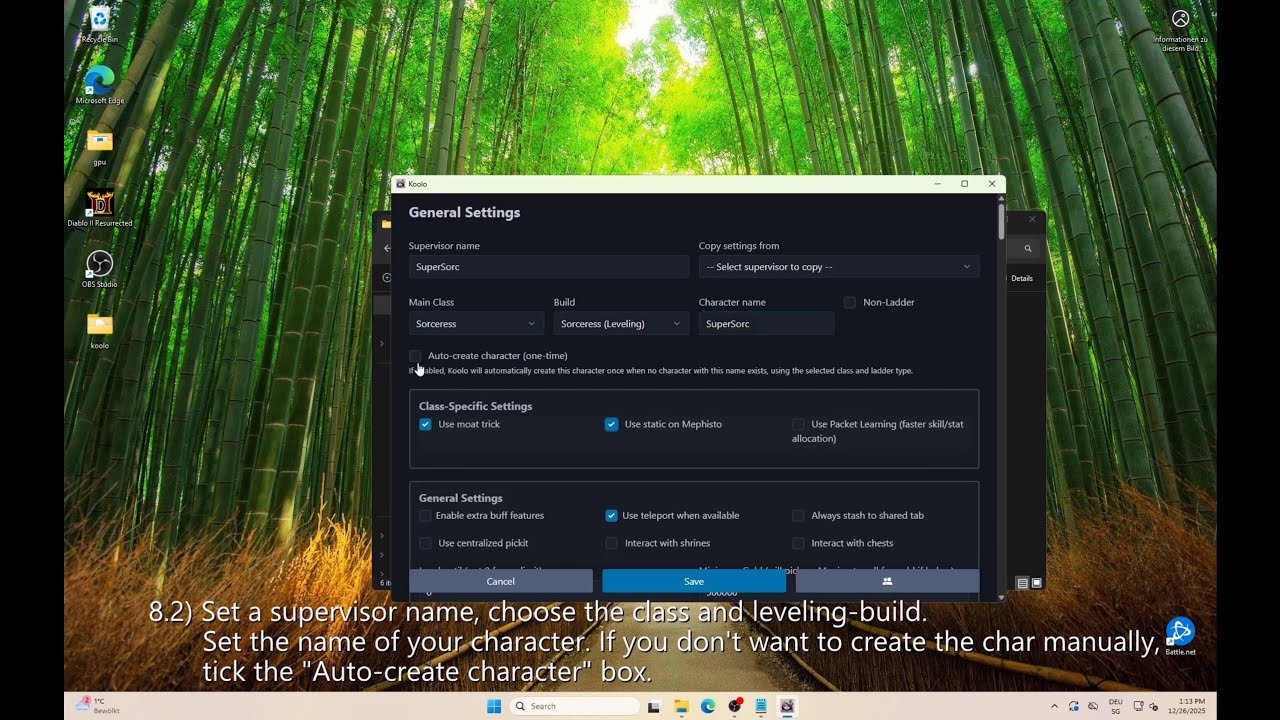
8) Config Profile

9) Start leveling

------------------------------------------------------------------------------------------------------

TOKEN auth setup:

Token authentication is the same as launching the game through the Battle.net launcher. It uses an encrypted authentication token stored in your computer's registry.

1. To set it up, you will first need to obtain the authentication token. This can be done from the following URL: us.battle.net/login/en/?externalChallenge=login&app=OSI

Log in with your battle.net account in that after which it will redirect your browser to a URL like "http://localhost:0/?ST=US-xxxxxxxxxxxxxxxxxxxxxxxxxxxxxxxxxxxxxx-466067277&flow=somethingsomething"

IMPORTANT!!!!! Do not share that URL with anyone (including developers or staff) as that contains the authentication token that can be used to access your account without username/password. KEEP IT SAFE!
Now you can extract the authentication token from the URL, the token is the US-XXXXXXXXXXX-XXXXX part of the URL. So if the URL is http://localhost:0/?ST=US-(lotsofsymbolshere)-xxxxxx&somethingelse&something you need to get the us-(lotsofsymbolshere)-xxxxxxx part

2. Copy the token, and paste it into your character settings & choose the Auth Token authentication method.

Комментарии

Информация по комментариям в разработке

Похожие видео

  • О нас
  • Контакты
  • Отказ от ответственности - Disclaimer
  • Условия использования сайта - TOS
  • Политика конфиденциальности

video2dn Copyright © 2023 - 2025

Контакты для правообладателей [email protected]