Logo video2dn
  • Сохранить видео с ютуба
  • Категории
    • Музыка
    • Кино и Анимация
    • Автомобили
    • Животные
    • Спорт
    • Путешествия
    • Игры
    • Люди и Блоги
    • Юмор
    • Развлечения
    • Новости и Политика
    • Howto и Стиль
    • Diy своими руками
    • Образование
    • Наука и Технологии
    • Некоммерческие Организации
  • О сайте

Скачать или смотреть Easily Find Lost AADHAAR Card Enrollment Number

  • AADHAAR
  • 2017-05-26
  • 8065
Easily Find Lost AADHAAR Card Enrollment Number
FindLostAADHAAREnrollment NumberSlipRegistration
  • ok logo

Скачать Easily Find Lost AADHAAR Card Enrollment Number бесплатно в качестве 4к (2к / 1080p)

У нас вы можете скачать бесплатно Easily Find Lost AADHAAR Card Enrollment Number или посмотреть видео с ютуба в максимальном доступном качестве.

Для скачивания выберите вариант из формы ниже:

  • Информация по загрузке:

Cкачать музыку Easily Find Lost AADHAAR Card Enrollment Number бесплатно в формате MP3:

Если иконки загрузки не отобразились, ПОЖАЛУЙСТА, НАЖМИТЕ ЗДЕСЬ или обновите страницу
Если у вас возникли трудности с загрузкой, пожалуйста, свяжитесь с нами по контактам, указанным в нижней части страницы.
Спасибо за использование сервиса video2dn.com

Описание к видео Easily Find Lost AADHAAR Card Enrollment Number

Hello Friends,

In this video we will learn how to find our lost AADHAAR Card enrollment number.
First open a web browser and go to this url, https://uidai.gov.in
Click on "Retrieve Lost UID/EID" under "Aadhaar Enrolment".
Page to "Retrieve your lost EID/UID" will open.
In the left section, click on "Enrolment Number (EID)" option for "You want to retrieve your lost:" selection.
In the middle section, fill in your "Full Name", exactly as it was given during AADHAAR registration.
Fill in either your registered "Email" or "Mobile" that was given during AADHAAR enrolment.
Fill in the "Security Code" exactly as show in the box.
Once all details are filled in, click on the "Send One Time Password" button.

The system will verify the details you entered in the AADHAAR system.
If there is any mismatch such as either Name and/or Email/Mobile not entered exactly as it was given during AADHAAR registration, the system will show error at the bottom of the form.
Once the details are verified, the AADHAAR system will automatically send an OTP (One Time Password) to the given registered Email/Mobile.
Fill the received OTP in the right section and click on the "Verify OTP" button.
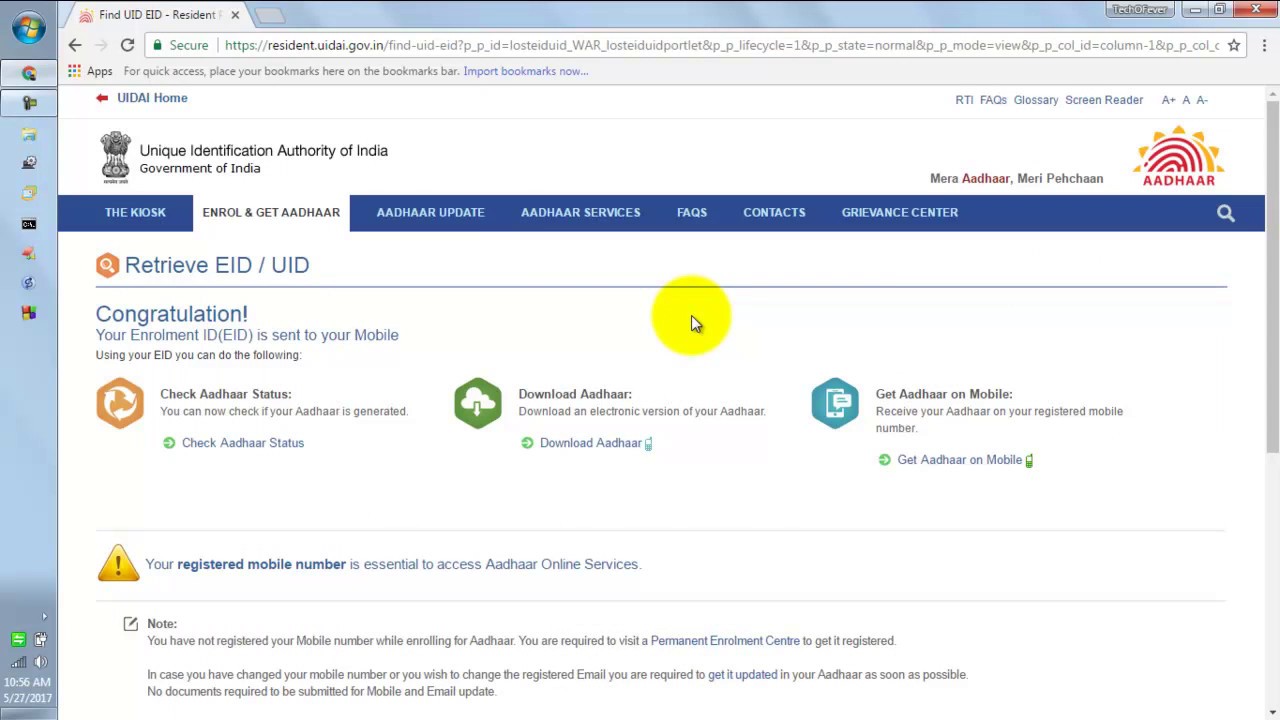
Once correct OTP is entered a confirmation page will be displayed with message "Your Enrolment Id(EID) is sent to your Mobile" and the AADHAAR system will automatically send your Enrolment Id to the given registered Email/Mobile.

For more information visit http://aadhaaruidai.com/find-lost-enr...

Комментарии

Информация по комментариям в разработке

Похожие видео

  • О нас
  • Контакты
  • Отказ от ответственности - Disclaimer
  • Условия использования сайта - TOS
  • Политика конфиденциальности

video2dn Copyright © 2023 - 2025

Контакты для правообладателей [email protected]