Logo video2dn
  • Сохранить видео с ютуба
  • Категории
    • Музыка
    • Кино и Анимация
    • Автомобили
    • Животные
    • Спорт
    • Путешествия
    • Игры
    • Люди и Блоги
    • Юмор
    • Развлечения
    • Новости и Политика
    • Howto и Стиль
    • Diy своими руками
    • Образование
    • Наука и Технологии
    • Некоммерческие Организации
  • О сайте

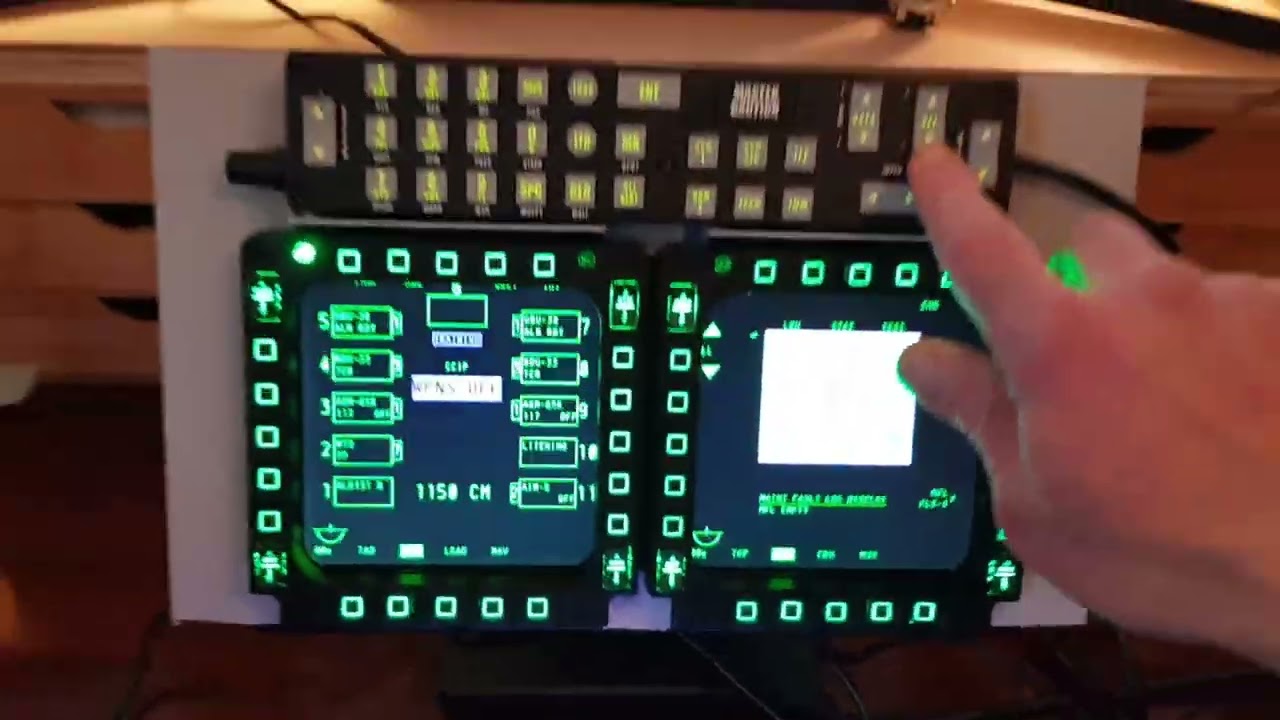
Скачать или смотреть Connect Thrustmaster Cougar MFDs with UFC to monitor for A-10C Warthog in DCS Flight Sim

  • Strak
  • 2022-01-30
  • 23428
Connect Thrustmaster Cougar MFDs with UFC to monitor for A-10C Warthog in DCS Flight Sim
DCS WorldFlight SimulatorCougar MFDsBuddy Fox UFCA-10C ThunderboltA-10C WarthogWarthog Cockpit
  • ok logo

Скачать Connect Thrustmaster Cougar MFDs with UFC to monitor for A-10C Warthog in DCS Flight Sim бесплатно в качестве 4к (2к / 1080p)

У нас вы можете скачать бесплатно Connect Thrustmaster Cougar MFDs with UFC to monitor for A-10C Warthog in DCS Flight Sim или посмотреть видео с ютуба в максимальном доступном качестве.

Для скачивания выберите вариант из формы ниже:

  • Информация по загрузке:

Cкачать музыку Connect Thrustmaster Cougar MFDs with UFC to monitor for A-10C Warthog in DCS Flight Sim бесплатно в формате MP3:

Если иконки загрузки не отобразились, ПОЖАЛУЙСТА, НАЖМИТЕ ЗДЕСЬ или обновите страницу
Если у вас возникли трудности с загрузкой, пожалуйста, свяжитесь с нами по контактам, указанным в нижней части страницы.
Спасибо за использование сервиса video2dn.com

Описание к видео Connect Thrustmaster Cougar MFDs with UFC to monitor for A-10C Warthog in DCS Flight Sim

Stuff I used mostly Amazon:
Eyoyo 12 Inch Portable HDMI Monitor TFT LCD
Midream Tilt Mounted Fold Monitor Holder Vesa
Unitek 4 port USB hub
TM Cougar MFDs
PVC strip / superglue / heavy duty velcro
UFC from Buddy Fox


Connections:
MFDs + UFC into USB hub
USB hub from monitor to PC hub (power)
HDMI cable from monitor to PC

DCS setup:
Create MonitorSetup folder under Config folder (if not already there)
Create a new MFCD.lua file and fiddle with pixel positions for your monitors.
Then select this new file under DCS settings and fiddle until centred.
This guy has done a great job explaining the .lua file in DCS go there for details:
https://forums.eagle.ru/topic/258724-...
Update 2025 - this YT guy has done a good job on setting the monitors and the .lua file, if you get stuck on this bit:
   • Ep: 20 - How to Export DCS Viewports | Fli...  

Notes:
The monitor (and MFDs) has a sloping edge which is a nuisance, if you can find a simple square edge monitor/bezel this will be easier for mounting. I mounted on the bezel using PVC to ensure level fitting (not the screen).
The Vesa mount I recommend, it is very solid and very stiff with rubber feet, I can push all buttons without movement on my desk.
Buddy Fox UFC is a solid piece of kit, all buttons easy to set up in DCS, highly recommend!

Sound:
I have the Logitech G560 with subwoofer under table against wall and the engine sounds during startup taxi and in flight for airbus warthog etc are incredible!

Комментарии

Информация по комментариям в разработке

Похожие видео

  • О нас
  • Контакты
  • Отказ от ответственности - Disclaimer
  • Условия использования сайта - TOS
  • Политика конфиденциальности

video2dn Copyright © 2023 - 2025

Контакты для правообладателей [email protected]