Logo video2dn
  • Сохранить видео с ютуба
  • Категории
    • Музыка
    • Кино и Анимация
    • Автомобили
    • Животные
    • Спорт
    • Путешествия
    • Игры
    • Люди и Блоги
    • Юмор
    • Развлечения
    • Новости и Политика
    • Howto и Стиль
    • Diy своими руками
    • Образование
    • Наука и Технологии
    • Некоммерческие Организации
  • О сайте

Скачать или смотреть AttendaGo Tutorial: Creating Event Route Maps

  • AttendaGo
  • 2023-02-14
  • 62
AttendaGo Tutorial: Creating Event Route Maps
Run routesAttendagotutorial
  • ok logo

Скачать AttendaGo Tutorial: Creating Event Route Maps бесплатно в качестве 4к (2к / 1080p)

У нас вы можете скачать бесплатно AttendaGo Tutorial: Creating Event Route Maps или посмотреть видео с ютуба в максимальном доступном качестве.

Для скачивания выберите вариант из формы ниже:

  • Информация по загрузке:

Cкачать музыку AttendaGo Tutorial: Creating Event Route Maps бесплатно в формате MP3:

Если иконки загрузки не отобразились, ПОЖАЛУЙСТА, НАЖМИТЕ ЗДЕСЬ или обновите страницу
Если у вас возникли трудности с загрузкой, пожалуйста, свяжитесь с нами по контактам, указанным в нижней части страницы.
Спасибо за использование сервиса video2dn.com

Описание к видео AttendaGo Tutorial: Creating Event Route Maps

This tutorial is going to cover how to create google route maps that you can then later attach to your AttendaGo events.

Steps start at 2:10 of video
Critical NOTES at 3:30, 5:25, 5:55

AttendaGo Route maps are very effective for run clubs, bike clubs, scavenger hunts or any type of event where you need to provide turn-by-turn directions to your event users.

Disclaimer: This route map technique is using Google Maps. Google route maps are not an actual function of AttendaGo and thus AttendaGo has no control over how Google utilizes route maps on different devices. Sometimes the route map does not work as intended because Google Maps is always trying to find the fastest path between two end points. The disclaimer aside, the method we are covering today has a very high success rate if our directions are followed precisely.

Lets get started. For todays tutorial we are going to create a Run Route used for run clubs.

=====================
Open your browser and go to https://maps.google.com

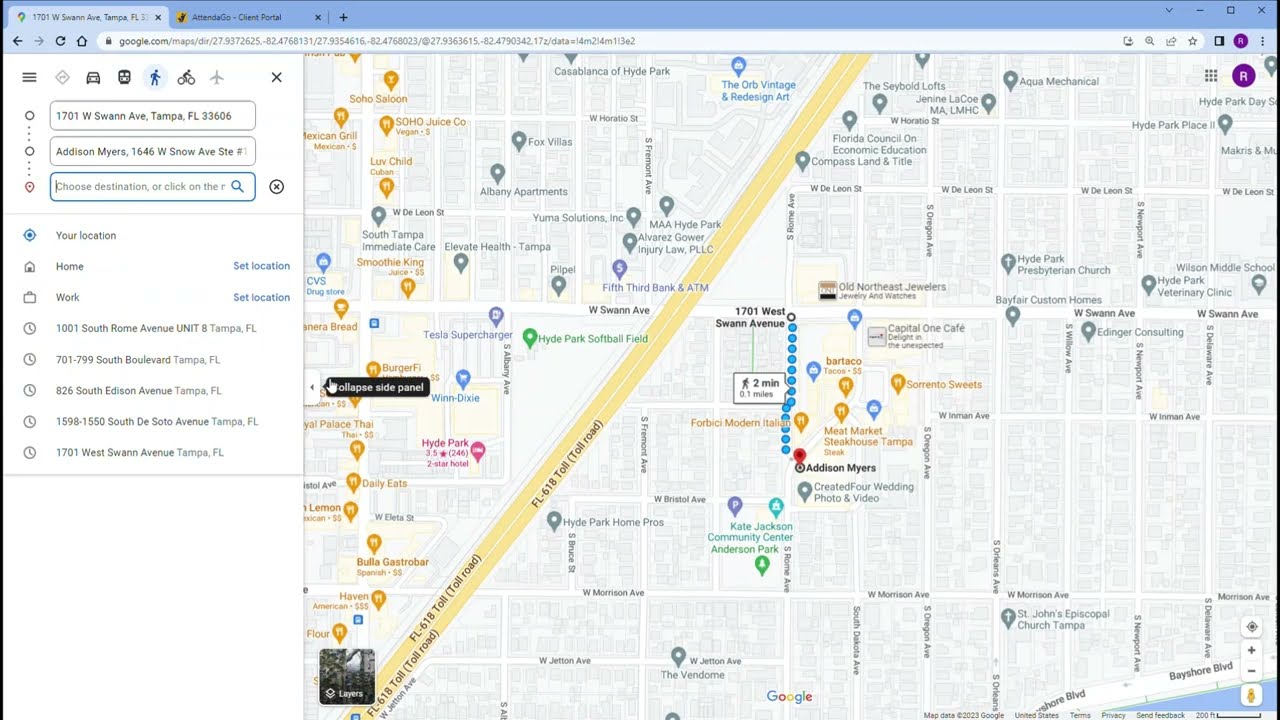
Step 1: right click on your first starting point and select: "Directions From Here". This will open up the destination points window to the left of your screen.

Step 2: in the destination points window, select your mode of transportation. For a Run Route, we are going to select the walking mode.

Step 3. On the map, right click on the first turn of your route path and select: "Directions To Here". This will draw your first route line.

NOTE: This is the ONLY time you should right click a spot to select the Directions To Here option. If you continue to do step #3 as your next path point your route map will not work correctly.

Step 4: In the destination points window you will now see your previous points listed. Underneath the last listed point click on the Add Destination" button. This will add a blank point input field.

Step 5: Back on the map, click the NEXT turn point - this will both draw the next route line and add that location to the new blank points field.

NOTE: Google is always trying to find the fastest path between to points; so in some cases, the drawn path isn't exactly your desired path. To correct this, click on and drag the path back to the desired path to that next point.

Step 6: Repeats Steps 4 & 5 until you have completed your route - for a Run or Bike route, that is typically a loop or out & back path.

===================
NOTE: The Destination Points window only allows for 11 destination points. If your route needs more points then try reducing your current point list by merging existing points together. An example would be instead of having points #2, #3 and #4, remove #3 and try to force the path from #2 direct to #4 - if google redraws the path to an undesired location, then drag it back to where it needs to go.

FOR ROUTE MAPS THAT NEED MORE THAN 11 POINTS: there is a link at the bottom of this tutorial on how to do advance extended route map paths. AttendaGo does not cover this advanced method but we have gotten it work.
=====================

Step 7: When the route maps is complete, in the destination points window click on "Send Directions To Your Phone". Select Text or Email or which ever method is best for you; probably email since you are on your desktop doing this. This will send you a text/email of the Route Map LINK. Copy that link.

Step 8: TEST your route map. Open the link from your phone, as a user would using the AttendaGo app, and test that the route map you created does in fact work as desired. If certain steps in your path of changed or not as you created them you will need to rework your route and TEST it again.

Step 9: In the AttendaGo Portal, go to "Event Mgmt - File/URL Manager". Add a file/link name. For file type select the "URL: Map Link" option Add a description and finally paste in the Route Map Link that google emailed you. Finally, SAVE the resource.

Step 10: The final step is to attach this Route Map to your event. Go to "Event Mgmt - Events" and select your desired event. Go to the "Documents and Links" section at the bottom of the form and click on the "ADD" button. Select your new route map; if necessary add a link expiration date and then select your Pre-Register and Pre-Checkin viewing options. For this example, we are going not going to add an expiration date and are going to make the link viewable at all times. SAVE the attachment.

Last, in the AttendaGo app, find your event and beneath location map, you will see your new route map listed for users to click on. When
user click on the route map, it will automatically take them to Google Maps and recreate your route map on their phone. Users can then click
on "Start Directions" to get an audio read out of those directions.

ADVANCED EXTENDED PATH ROUTE MAP: https://winbuzzer.com/2021/02/12/how-to-pl...

Комментарии

Информация по комментариям в разработке

Похожие видео

  • О нас
  • Контакты
  • Отказ от ответственности - Disclaimer
  • Условия использования сайта - TOS
  • Политика конфиденциальности

video2dn Copyright © 2023 - 2025

Контакты для правообладателей [email protected]