Logo video2dn
  • Сохранить видео с ютуба
  • Категории
    • Музыка
    • Кино и Анимация
    • Автомобили
    • Животные
    • Спорт
    • Путешествия
    • Игры
    • Люди и Блоги
    • Юмор
    • Развлечения
    • Новости и Политика
    • Howto и Стиль
    • Diy своими руками
    • Образование
    • Наука и Технологии
    • Некоммерческие Организации
  • О сайте

Скачать или смотреть Proximity Messaging

  • Visit Widget
  • 2024-02-09
  • 209
Proximity Messaging
  • ok logo

Скачать Proximity Messaging бесплатно в качестве 4к (2к / 1080p)

У нас вы можете скачать бесплатно Proximity Messaging или посмотреть видео с ютуба в максимальном доступном качестве.

Для скачивания выберите вариант из формы ниже:

  • Информация по загрузке:

Cкачать музыку Proximity Messaging бесплатно в формате MP3:

Если иконки загрузки не отобразились, ПОЖАЛУЙСТА, НАЖМИТЕ ЗДЕСЬ или обновите страницу
Если у вас возникли трудности с загрузкой, пожалуйста, свяжитесь с нами по контактам, указанным в нижней части страницы.
Спасибо за использование сервиса video2dn.com

Описание к видео Proximity Messaging

We are excited to announce proximity messaging on the admin console.

0:03
Within the widget, proximity messages allow destinations to set up geo fences around key attractions, businesses or events and trigger notifications.

0:12
When a user enters the defined area.

0:14
In order to access the admin console, you will need to click log in in the upper right hand corner.

0:20
If you don't have admin access, please reach out to your visit widget account manager to gain access while logged in as an admin, you will see the create button appear.

0:29
If you don't see the create button, you may need to click on your name and turn admin mode on.

0:37
As you navigate through the listings or events, you will see a bell icon in the lower right hand corner of the image, choose the listing or event for which you want to set up a proximity message and click on the bell.

0:51
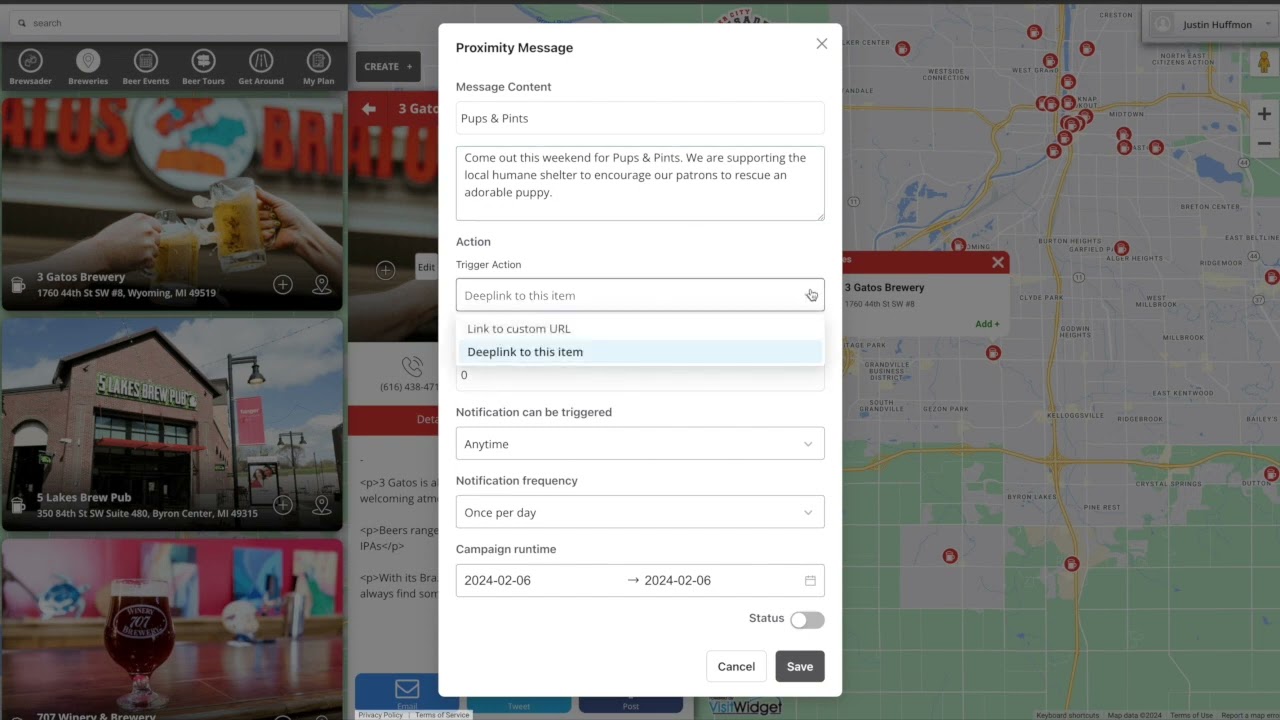
After you have clicked on the bell icon, you will see a prompt pop up with seven fields.

0:56
The first two fields are the title and the body of the notification.

1:01
The third field is the trigger action.

1:04
You have the option to deep link to this listing or event, meaning when clicked, the listing or event will open natively in the app or you can link out to a custom URL of your choosing like a web page to purchase tickets.

1:19
The next field is the geo fence radius defined in meters.

1:23
You can use Google Maps to help you determine how big of a GEO fence you want to set for each message by using the measure distance tool.

1:31
The next field indicates when the GEO fens trigger is active or inactive.

1:35
You have the option to trigger any time or 24 hours a day during default business hours, which is set from 9 a.m. to 5 p.m. daily or you can set custom hours on a daily basis.

1:49
The notification frequency fill determines how many times or how often the notification will trigger for a given user.

1:56
You have the option to select once, once per hour, once per day, once per week or once per month.

2:04
We would advise caution when setting frequency to prevent nuisance notifications which can impact app uninstalls.

2:11
The final field is campaign run time where you can choose the exact dates you want your notification to run last but not least, don't forget to turn on the notification by tapping on the status toggle switch and clicking.

2:26
Save.

2:27
This feature needs to be turned on by your account manager.

2:30
If you don't see the bell, when logged in as an admin, please reach out to your account manager and we can set up a training session to assist you with this powerful new tool.

Комментарии

Информация по комментариям в разработке

Похожие видео

  • О нас
  • Контакты
  • Отказ от ответственности - Disclaimer
  • Условия использования сайта - TOS
  • Политика конфиденциальности

video2dn Copyright © 2023 - 2025

Контакты для правообладателей [email protected]