1. Sign-Up and Login
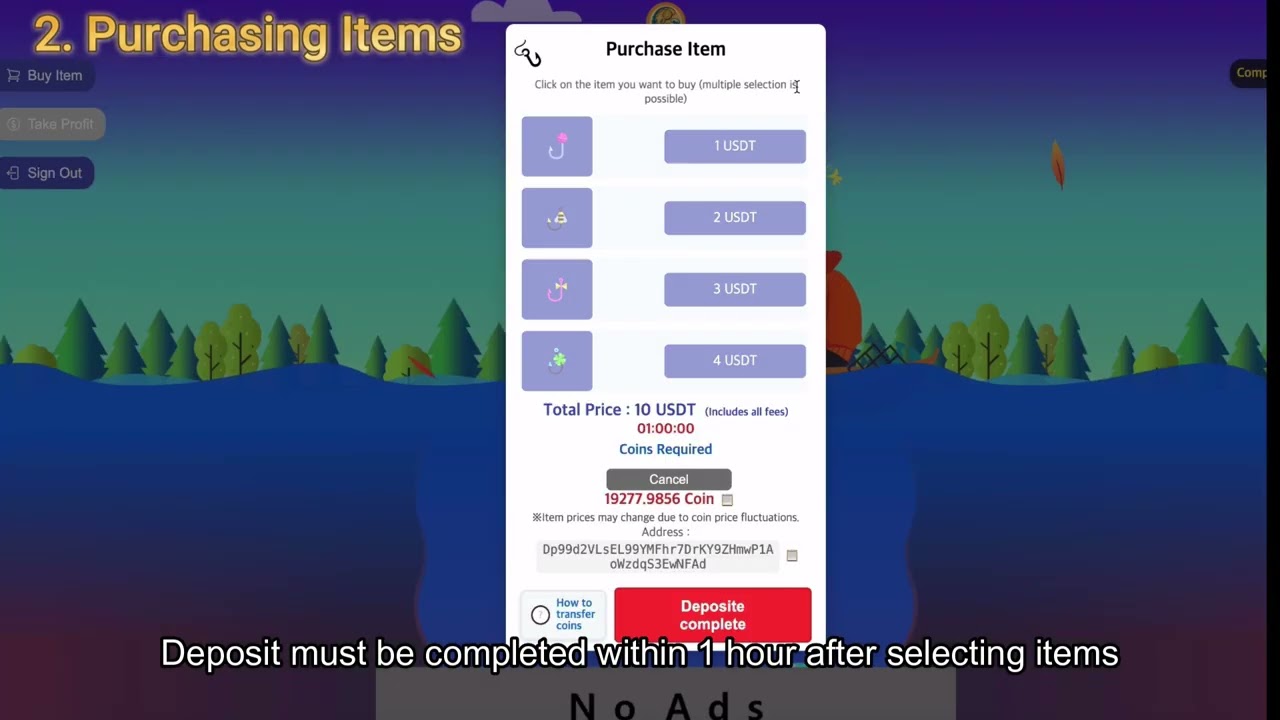
2. Purchasing Items
3. Sending YU Coins
4. Completing Deposit
5. Receiving Rewards
**YU Game Participation Procedure**
Touch the game link, then tap the … at the bottom right of your phone → tap Open in another browser → tap the three lines (menu) at the top or bottom right → select Add to Home Screen. After adding, start member registration.
Copy the referral code, go to the game app, create a username (8 characters, alphanumeric, e.g., kbs00001), enter your password twice, and paste the referral code into the first field. Then tap the menu (three lines), exit, copy your LBank UID, paste it into the game app UID field, and tap Register to complete signup.
Enter your ID, log in, and tap Package Purchase at the top left. Next to the desired amount, tap the fishing hook icon, then at the bottom center tap the blue Confirm Item button. This will display the deposit address and the number of coins, both with a copy function.
First copy the coin address, go to LBank, tap Withdraw YU Coin, paste the copied address, and select Solana as the network. Then return to the game app, copy the coin quantity, paste it into LBank, enter your full name accurately, select Others at the bottom for Exchange, complete email verification and OTP, then send. YU coins will be deposited into the game app.
Important: When you receive the email confirming that the YU coin withdrawal has been completed, go to the game app and tap the red Deposit Completed button at the bottom.
If you press the deposit confirmation button without checking the email first, an error may occur, so please be careful.
Thank you.
Информация по комментариям в разработке