Logo video2dn
  • Сохранить видео с ютуба
  • Категории
    • Музыка
    • Кино и Анимация
    • Автомобили
    • Животные
    • Спорт
    • Путешествия
    • Игры
    • Люди и Блоги
    • Юмор
    • Развлечения
    • Новости и Политика
    • Howto и Стиль
    • Diy своими руками
    • Образование
    • Наука и Технологии
    • Некоммерческие Организации
  • О сайте

Скачать или смотреть How to get rid of visibility issues in Battlefield 5

  • mikisol
  • 2019-05-18
  • 6007
How to get rid of visibility issues in Battlefield 5
Battlefield 5reshaderemove visibility issuesbattlefield 5 tips and tricksbf5mikisol
  • ok logo

Скачать How to get rid of visibility issues in Battlefield 5 бесплатно в качестве 4к (2к / 1080p)

У нас вы можете скачать бесплатно How to get rid of visibility issues in Battlefield 5 или посмотреть видео с ютуба в максимальном доступном качестве.

Для скачивания выберите вариант из формы ниже:

  • Информация по загрузке:

Cкачать музыку How to get rid of visibility issues in Battlefield 5 бесплатно в формате MP3:

Если иконки загрузки не отобразились, ПОЖАЛУЙСТА, НАЖМИТЕ ЗДЕСЬ или обновите страницу
Если у вас возникли трудности с загрузкой, пожалуйста, свяжитесь с нами по контактам, указанным в нижней части страницы.
Спасибо за использование сервиса video2dn.com

Описание к видео How to get rid of visibility issues in Battlefield 5

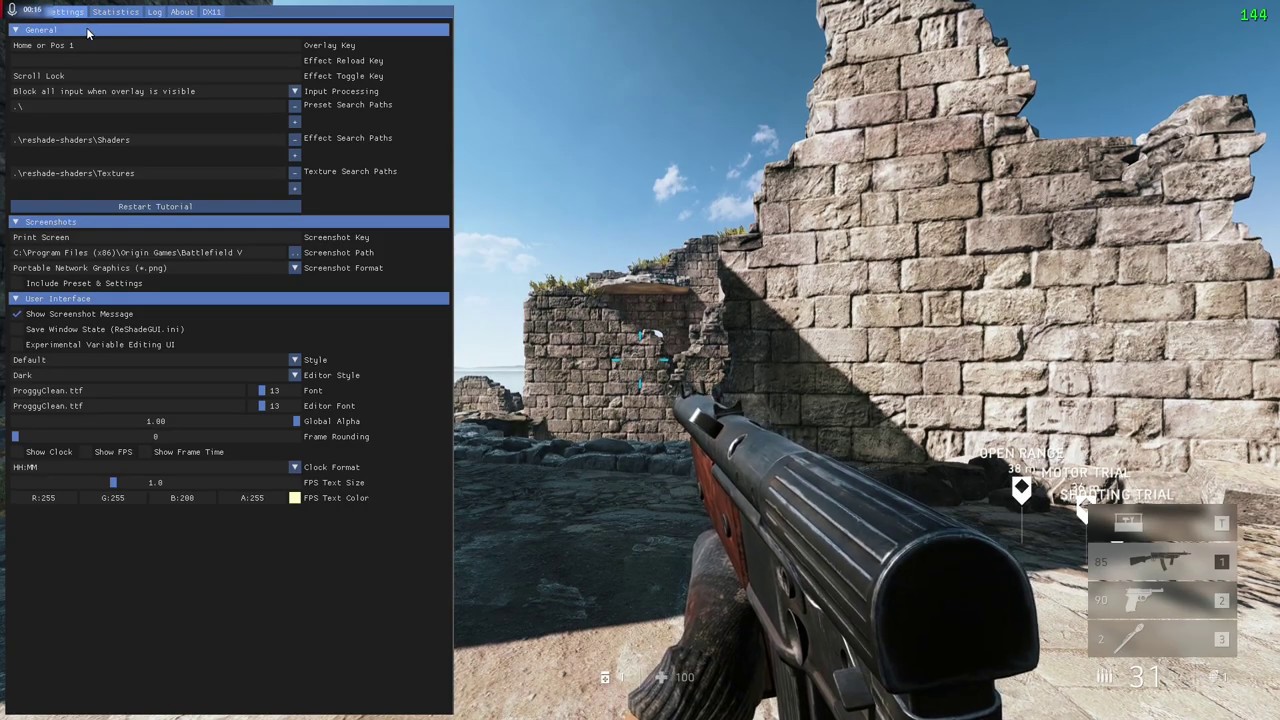
We all know how good visibility is in Battlefield 5 and how blury the game can look like, especially on 1440p. Not many people are talking about this, idk why so here is a video to help u with that.

1. Make a new .txt file (notepad or anything)

2. Copy - paste this commands

GameTime.Maxvariablefps 144
PerfOverlay.FpsDisplayScale 2
PerfOverlay.DrawFps 1
PostProcess.DofMethod 0
PostProcess.DynamicAOEnable 0
PostProcess.DynamicAOMethod 0
Render.VSyncFlashTestEnable 0
WorldRender.TransparencyShadowmapsEnable 0
WorldRender.SpotLightShadowmapEnable 0
WorldRender.SpotLightShadowmapResolution 1
WorldRender.PlanarReflectionEnable 0
RenderDevice.Dx11Enable 0
RenderDevice.Dx11Dot1Enable 0
RenderDevice.Dx11Dot1RuntimeEnable 0
RenderDevice.DxDiagDriverDectectionEnable 0
RenderDevice.VSyncEnable 0
RenderDevice.StereoConvergenceScale 0
RenderDevice.StereoSeparationScale 0
RenderDevice.StereoSoldierZoomConvergenceScale 0

Have in mind that my fps is capped to a 144, just a personal preference, play arround with it accordingly to a refresh rate of ur monitor, you can also change the size of fps counter.

3. Open in-game video settings and put 1% on motion blur. This will significantly reduce TAA blur.


4. Download Reshade, install it for Battlefield V and copy out my settings. Have in mind that after it you might will need to reduce your ingame brightness for just a little bit to compensate for added filters that are making game a lot brighter.

5. Pick thompson or suomi and farm pronies!
________________________________________________________________________________
Thats pretty much it. The video I included might not be the best example of how much this actually benefits you but for maps like Narvik or Fjell which this is not just more pleasing for the eyes but you can literally sport people from Narvik bridge, camping on a ledge (where artillery cannons are placed). Prone MG-s on the ground on Devastation? Not a problem anymore. Campers on a Fjell ledge rocks? No problem anymore. Crouch running enemies in Arras grass/corn fields or whatever that shitty grass is? Not anymore.
Main concern of many players is impact on FPS. Im playing on Rx 580 4gb and it takes away around 10-15 fps. A small loss in fps yet a huge increase in visibility. On better GPU-s it will impact fps even less.

Комментарии

Информация по комментариям в разработке

Похожие видео

  • О нас
  • Контакты
  • Отказ от ответственности - Disclaimer
  • Условия использования сайта - TOS
  • Политика конфиденциальности

video2dn Copyright © 2023 - 2025

Контакты для правообладателей [email protected]